Samsung Galaxy Watch Active2 - Call a Number
Here's how to place a call from your Galaxy Watch Active2.
- From your Android™ smartphone or Apple® iPhone® , ensure your Galaxy Watch Active2 software is up to date as the steps below apply to the most recent version.
- When a call is placed from the watch, the recipient's caller ID displays the phone number of your companion smartphone when used with Number Share or Bluetooth.®
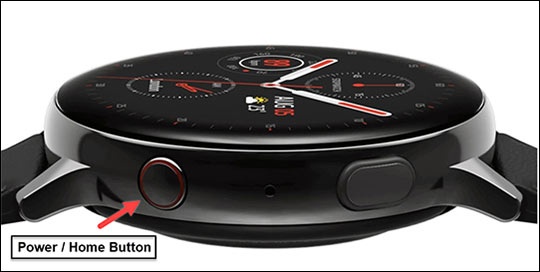
- From the watch screen, press theHome buttonto open the apps screen.
- Double-tap thePhone icon.
- Do one of the following:
- Tap theContacts iconthen select the applicable contact.
- Swipe up to scroll through the Recents list then tap the applicable contact or phone number.
- Tap theDial iconthen dial the 10-digit number.
- Tap theCall icon.