Samsung Galaxy Watch Active2 - Use Pedometer
Here's how to set up and use the pedometer on your Galaxy Watch Active2.
- From your Android™ smartphone or Apple® iPhone® , ensure your Galaxy Watch Active2 software is up to date as the steps below apply to the most recent version.
- In order to complete all of the steps below, ensure the Samsung Health app is installed via the Google Play™ Store or App Store® .
Initial Setup
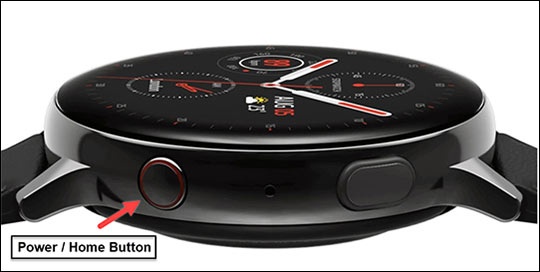
- From the watch screen, press theHome buttonto open the apps screen.
- Double-tap theSamsung Health icon
.
- Swipe up on the screen then tapSettings.
- TapProfile.
- Tap on and adjust any of the following as desired:
- Gender
- Date of birth
- Height
- Weight
- Tap theBack button.
- TapUnits.
- Tap on and adjust any of the following as desired:
- Distance unit
- Temp. unit
- Water unit
Change Goal
- From the watch screen, press theHome buttonto open the apps screen.
- Double-tap theSamsung Health icon
- Swipe on the screen then tapSteps.
- TapSettings.
- TapStep target.
- If presented with the 'Last week's average steps' screen tap the screen to continue.
- Swipe up or down to the desired number of steps then tapDone.
Change User Profile
- From the watch screen, press theHome buttonto open the apps screen.
- Double-tap theSamsung Health icon
- Swipe up on the screen then tapSettings.
- TapProfile.
- Tap on and adjust any of the following as desired:
- Gender
- Date of birth
- Height
- Weight
- Tap theBack button.
- TapUnits.
- Tap on and adjust any of the following as desired:
- Distance unit
- Temp. unit
- Water unit