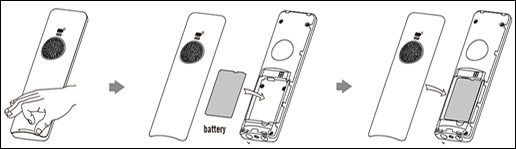
One Talk W56HV IP DECT Cordless Handset Insert / Remove Battery
One Talk W56HV IP DECT Cordless Handset
Insert / Remove Battery A quick troubleshooting step is to remove and re-insert the battery. If the W56HV cordless handset bundled with your One Talk W60 DECT IP phone is slow or frozen or won't power on, this may help it run properly again.
Steps
- From the back of the device, locate the notch on the bottom edge of the cover then gently pull the battery cover off.
- Remove the battery using the diagram below.
- To reinsert the battery, ensure the contacts on the battery and device are aligned then press the battery into position.
- Align the cover and gently press it into place.