Session status messages
Session Status

Due to inactivity, your session will end in approximately 2 minutes. Extend your session by clicking OK below.

Due to inactivity, your session has expired. Please sign in again to continue.

Samsung Galaxy Watch3 - Delete Paired Bluetooth Connection

2026-10-05 07:41:10.274

Samsung Galaxy Watch3 - Delete Paired Bluetooth Connection

Here's how to remove paired Bluetooth devices from your Galaxy Watch3.
From your Android™ smartphone or Apple® iPhone®, ensure your Galaxy Watch3 software is up to date as the steps below apply to the most recent version.
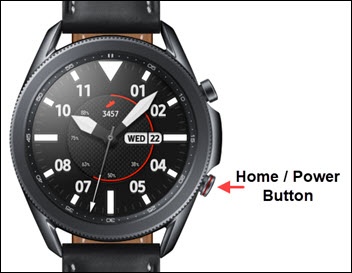
  1. From the watch screen, press the
    Home button
    to open the apps screen.
    Press the Home button
  2. Tap the
    Settings icon Settings icon
    .
  3. Navigate:
    Connections
    Bluetooth
    Bluetooth audio
  4. Tap the
    Gear icon
    Settings icon to the right of the applicable connection.
  5. Tap
    Unpair
    .