Verizon Orbic Speed - Enable / Disable / Modify SIM PIN
Here's how to change the SIM PIN for your Orbic Speed or turn it on or off.
To lock the SIM card in your Orbic® Speed™ so it can't be used until a PIN is entered, view this info.
Enabling the Subscriber Identity Module (SIM) Personal Identification Number (PIN) locks the SIM card so it can't be used until the correct code is entered. If the incorrect PIN code is entered too many times, refer to Locating the 4G SIM PIN/PUK - My Verizon Website to obtain a new PIN Unblocking Key (PUK).
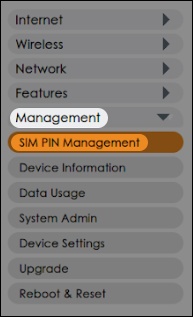
- From the left menu, clickManagement>SIM PIN Management.
- Do one of the following:
- Enable/Disable:
- To enable or disable the SIM PIN, select 'Enable' or 'Disable' from the dropdown, enter the default PIN, then clickApply.The default SIM PIN is 1111.
- Modify:
- To modify the SIM PIN, ensure the SIM PIN is enabled, enter the existing SIM PIN, type the new SIM PIN then clickApply.