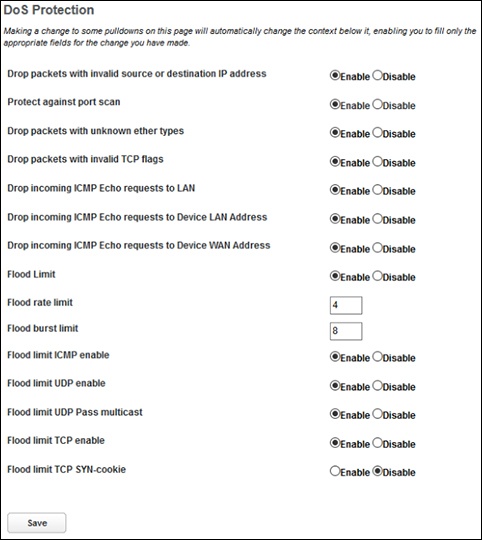
Arris NVG558 Router - Firewall - DoS Protection
Here's how to configure DoS protection for your NVG558 router.
The Arris NVG558 router includes default settings to block the most common types of Denial of Service (DoS) attacks. For special requirements or circumstances, a variety of additional blocking characteristics are offered. In most cases, you should accept the default settings.
- Sign in to the Admin WebGUI then clickFirewall.You must be connected to the network to access the admin page.
- ClickDoS Protection.
- Configure the following then clickSave:
- Drop packets with invalid source or destination IP address: Drops packets with invalid source or destination IP address(es).
- Protect against port scan: Detects and drops port scans.
- Drop packets with unknown ether types: Drops packets with unknown ether types.
- Drop packets with invalid TCP flags: Drops packets with invalid TCP flag settings (NULL, FIN, Xmas, etc.).
- Drop incoming ICMP Echo requests to LAN: Drops all ICMP (Ping) echo requests from LAN-side devices.
- Drop incoming ICMP Echo requests to device LAN Address: Drops all echo requests coming from the Internet to LAN-side addresses of the Gateway.
- Drop incoming ICMP Echo requests to device WAN Address: Drops all echo requests coming from the Internet to WAN-side addresses of the Gateway, except any cast addresses.
- Flood Limit: Detects and drops packet flooding attacks.
- Flood rate limit: Specifies the number of packets per second before dropping the remainder.
- Flood burst limit: Specifies the number of packets in a single burst before dropping the remainder.
- Flood limit ICMP enable: Detects and drops ICMP traffic packet flooding attempts.
- Flood limit UDP enable: Detects and drops UDP traffic packet flooding attempts.
- Flood limit UDP Pass multicast: Excludes UDP multicast traffic. On by default.
- Flood limit TCP enable: Excludes TCP traffic. Off by default.
- Flood limit TCP SYN-cookie: Drops TCP SYN cookies flooding attempts.