Stream TV Soundbar Pro - LED Status Indicators
View this info for explanations of status LEDs on your Stream TV Soundbar Pro.
The LED indicators are located behind the buttons on the front panel of the Stream TV Soundbar Pro. 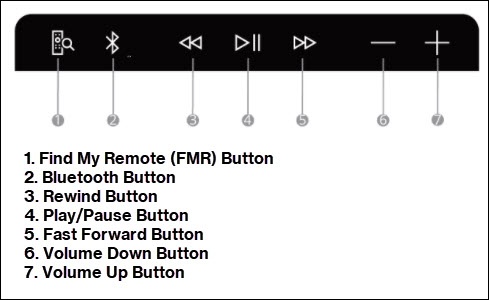
Device Status | Description | LED Status | LED Location |
No power | Not connected to power | Off | None |
Booting Up | Powered on and in the process of booting up | Soft Blink White | Play Button |
Not connected to display | No HDMI connectivity | Solid Red | Play Button |
Not connected to remote | Not paired with remote control | Solid Red | FMR Button |
Bluetooth Pairing (remote/device) | Press Bluetooth Button | Hard Blink Blue | Bluetooth Button |
Not connected to internet | No Wi-Fi or LAN connection | Solid Yellow | Play Button |
Accepting remote commands | Click buttons on remote or the buttons on the device | Blink Once White | Play Button |
Regular Usage (All connections are complete) Standby Mode | Device setup complete Soundbar in standby mode | 50% dim Solid White | Play Button |
Find My Remote | Press Find My Remote button | Hard Blink Green | FMR Button |
Update | Firmware Over-the-air update in progress | Fast Blink White | Play Button |