Wi-Fi Extender Mini View LED Status Indicators
Wi-Fi Extender Mini
View LED Status IndicatorsThe LED lights on your Wi-Fi Extender Mini indicate its power or connection status. A quick glance shows whether it's working properly or needs attention.
Steps
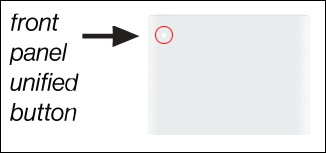
- Locate the LED indicator on the front of the Wi-Fi Mini Extender in the upper-left corner, then review the following chart:LED Status IndicatorsFunctionStatusLED PatternNormalNormal operationSolid WhitePairing modeSlow Blink BluePairing successfulFast Blink BlueWi-Fi disable by userSolid GreenNo SignalSolid RedIssue(s)No InternetSolid YellowHardware/System failure detectedSolid YellowSystem update errorFast Blink RedOverheatingWPS pairing failure
- If the status indicator is yellow, the Mini Extender either has no internet connection or is too close or far from the Router. See Wi-Fi Extender Mini - Activate / Set Up Device for info on proper setup.