TCL 30 V 5G - Common Camera Settings
Here's info on common camera settings (e.g., flash, timer, front / rear camera, etc.) for your TCL 30 V 5G.
For additional camera settings, refer to the user guide.
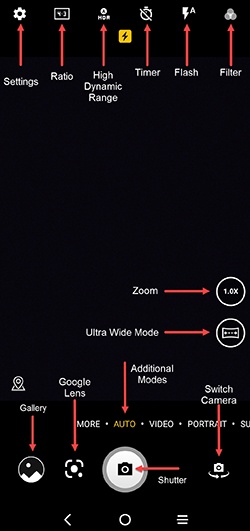
HDR (High Dynamic Range)
HDR (High Dynamic Range) combines photos or videos taken at different exposures for one optimal photo or video.
- From a Home screen, tap theCamera icon
.
If unavailable, swipe up to access all apps. - Tap theHDR iconto turn on or off.

Flash
- From a Home screen, tap theCamera iconIf unavailable, swipe up to access all apps.
- Tap theFlash icon.
- Select an option:
- Flash Auto
- On
- Off

Timer
- From a Home screen, tap theCamera iconIf unavailable, swipe up to access all apps.
- Tap theTimer icon.
- Select an option:
- Timer off
- 2s (seconds)
- 5s (seconds)
- 8s (seconds)

Settings
- From a Home screen, tap theCamera iconIf unavailable, swipe up to access all apps.
- TapSettings icon(upper-left).
- Select an option then adjust as preferred:
- Photo size
- Video quality
- Volume button function
- Touch to capture
- Grid
- Storage
- Save location information
- Shutter sound
- Reset settings

Additional Modes
- From a Home screen, tap theCamera iconIf unavailable, swipe up to access all apps.
- Select an option:
- Auto
- Video
- Portrait
- Super night
- Pro
Rear or Front Facing Camera
- From a Home screen, tap theCamera iconIf unavailable, swipe up to access all apps.
- Tap theCamera Facing iconto switch between rear and front-facing camera.
