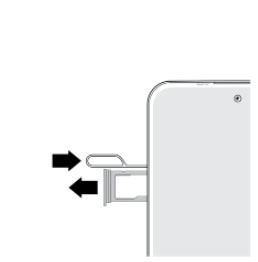
moto g stylus 5G Insert or Remove SD / Memory Card
moto g stylus 5G
Insert or Remove SD / Memory CardIf your moto g stylus 5G is low on storage, use an SD card for extra space. Follow these steps to insert or remove it without losing data.
Before you begin
Don't insert or remove the SD card while your moto g stylus 5G is powered on.
Steps
- Using the provided tool, pop out the SIM / SD card tray.
- Do one of the following:
- To insert the SD / memory card: Ensure the gold contacts are facing down, then press in on the card to lock it into place.
- To remove the SD / memory card: With the tray removed, insert the tool into the hole on the back of the tray to pop out the card.
- Push the tray back into the device.