Samsung Galaxy Watch3 - Add Cellular Plan
Here's info on how to add a cellular plan for your eSIM to your Galaxy Watch3.
If the Galaxy Watch was purchased outside of Verizon, contact us to start a line of service for your device.
Add Cellular Plan via Android Smartphone
- The Galaxy Watch3 can be set up via Number Share or as a standalone device. To use the Galaxy Watch3 without a companion device, complete the steps below then refer to Set Up as a Standalone Device.To set up with Number Share, the companion smartphone must be activated on the same Verizon account as the Galaxy Watch3.
- Before completing the steps below, verify:
- your Galaxy Watch has been paired with an Android™ smartphone.Refer to Connect to New Phone for assistance.
- your companion Android smartphone has a cellular or Wi-Fi connection.
- you're in a Verizon coverage area.
- your eSim activation has been processed and you've received the QR code via email.
- Open theGalaxy Wearable appon your companion phone.
- TapMobile plans.
- If a plan has previously been added, tap theMenu icon
(upper-right) then tap
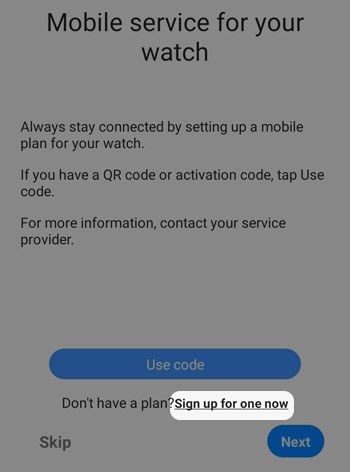
Add mobile plan. - From the 'Mobile service for your watch' screen, do one of the following:
- Set up with a QR code:
- TapUse code.
- Point the smartphone's camera at the QR code below and scan it.The QR code will only work if the Galaxy Watch3 has been activated on a Verizon mobile number.If prompted, tapAllowto grant camera permission.
- TapUse plan.
- Set up without a QR code on an existing Verizon account with a new Number Share line of service (if the Galaxy Watch3 was purchased outside of Verizon):
- TapSign up for one now.
- TapNext.
- Ensure the phone number to your Verizon smartphone is displayed then enter your My Verizon password and tapContinue.Only Account Owners or Account Managers can perform these steps. Here's additional info on account roles.
- Follow on-screen steps to select desired plan.Options vary by account plan.
- After mobile service has been set up, tapDonethe 'Mobile service for your watch' screen.The watch restarts.This process may take up to 2 minutes.

Continue to use in conjunction with a companion smartphone for maximum functionality. To un-pair your companion smartphone and use the Galaxy Watch3 as a standalone device, reset the watch then set up as a standalone device.
Do not reset network settings during reset.
Standalone mode can't be used with Number Share.
Add Cellular Plan via Apple iPhone
- The Galaxy Watch3 can be set up via Number Share or as a standalone device. To use the Galaxy Watch3 without a companion device, complete the steps below then refer to Set Up as a Standalone Device.To set up with Number Share, the companion smartphone must be activated on the same Verizon account as the Galaxy Watch3.
- Before completing the steps below, verify:
- your Galaxy Watch has been paired with an Apple® iPhone®.Refer to Connect to New Phone for assistance.
- your companion Apple iPhone has a cellular or Wi-Fi connection.
- you're in a Verizon coverage area.
- your eSim activation has been processed and you've received the QR code via email.
- Open the Samsung Galaxy Watch (Gear S) app.
- TapMobile plans.
- If a plan has previously been added, tap theMenu icon
(upper-right) then tap
Add mobile plan. - From the 'Set up a mobile plan' screen, selectUse code.
- If prompted, tapOKto allow Galaxy Watch to access your camera.
- Point the iPhone's camera at the QR code below and scan it.The QR code will only work if the Galaxy Watch3 has been activated on a Verizon mobile number.
- TapUse plan.
- From the 'Set up a mobile plan' screen, tapNEXT.
- TapConfirm.If presented, tapAllowfor notification permissions.
Continue to use in conjunction with a companion smartphone for maximum functionality. To un-pair your companion smartphone and use the Galaxy Watch3 as a standalone device, reset the watch then set up as a standalone device.
Do not reset network settings during reset.
Standalone mode can't be used with Number Share.