Wi-Fi Access Point Locate Ports, Connectors and Buttons
Wi-Fi Access Point
Locate Ports, Connectors and ButtonsReview this info for how to view the location of the various buttons, ports and connectors on your Wi-Fi Access Point.
Steps
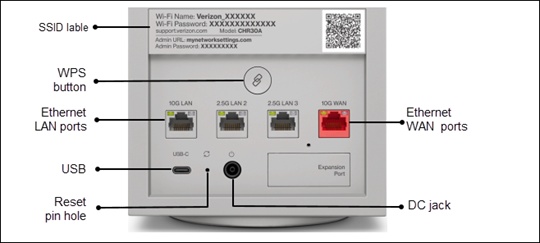
- View any of the following:
- WPS button: Allows quick access to the Wi-Fi Protected Setup (WPS) feature and pairing mode.
- Ethernet LAN: Connects devices to the Wi-Fi Access Point using Ethernet cables to join the local area network (LAN).
- Type-C USB: Provides up to 1000 mA at 5 VDC for attached devices. For example, you could charge a cell phone.
- Ethernet WAN: Connects to the internet using an Ethernet cable.
- Reset pin hole: Allows you to reset the Wi-Fi Access Point to the factory default settings.
- DC jack: Connects to an electrical wall outlet using the supplied power adapter.