Wireless Network Security Settings - Verizon Jetpack® 4G LTE Mobile Hotspot MiFi® 4620L
To view/change security settings (e.g., password) for your Verizon Jetpack - MiFi 4620L, see this info.
To view or change network security settings (e.g., Wi-Fi password, number of connected devices) for your Jetpack, see this info.
- Access the Admin Web Interface.
- From the Wi-Fi tab, clickWi-Fi Profile.
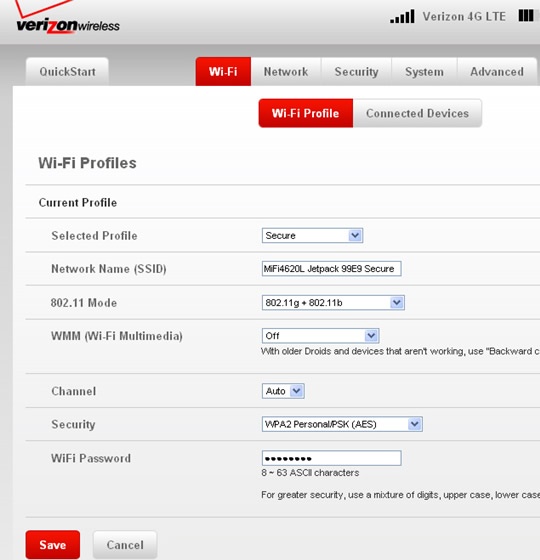
- Ensure the desired options are selected then clickSave(located in the lower-left).Depending upon the selected profile type, available options may vary.The info depicted in the following image are the default settings.
- Selected Profile
- Open
- Secure
- Temporary Hotspot
- Network Name (SSID)
- 802.11 Mode
- 802.11g + 802.11b
- 802.11g
- 802.11b
- 802.11n
- 802.11g + 802.11b + 802.11n
- WMM (Wi-Fi Multimedia)
- Off
- On - Standard
- Backward compatibility
- Channel
- Security
- WEP 64-bit
- WEP 128-bit
- WPA Personal/PSK (TKIP)
- WPA2 Personal/PSK (AES)
- WPA/WPA2 Personal Mixed Mode
- WiFi PasswordIf the WiFi Password is changed, the network settings on the computer must updated. For additional assistance, select the appropriate operating system: