Verizon LTE Internet and Home Phone - LED Status Troubleshooting
Here's how to check the LED status indicators to troubleshoot your Verizon Internet and Home Phone.
The former name of this device is the Verizon 4G LTE Broadband Router with Voice.
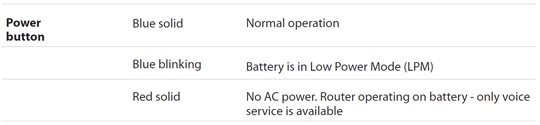
LEDs
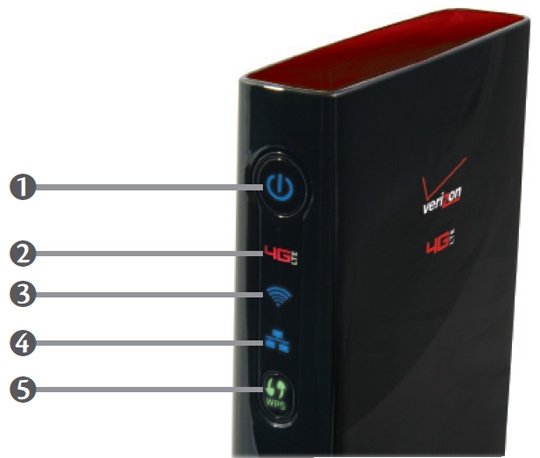
Ensure the LEDs are viewed directly and not at an angle. Even though they are off, some of the lights may appear to be on when viewed at an angle.
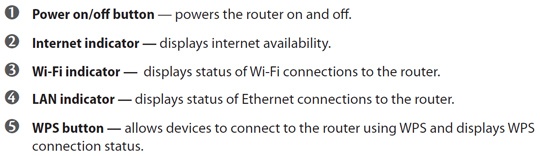
Power
For additional assistance, refer to Restore Factory Defaults.
Internet Indicator

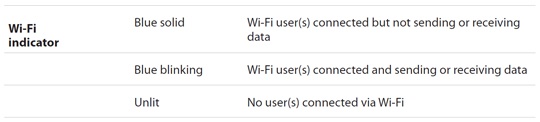
Wi-Fi Indicator
For additional assistance, refer to Enable/Disable Wireless Radio and/or Wi-Fi Security Settings.
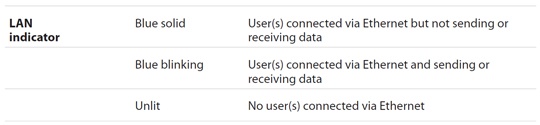
LAN Indicator
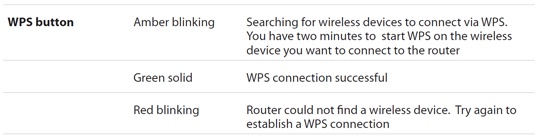
WPS Indicator