Delete SMTP Connections - Enterprise Messaging (EMAG)
Here's how to delete SMTP connections using the Enterprise Messaging (EMAG) portal.
- Sign in to Enterprise Messaging.
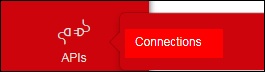
- From the left navigation menu hover over 'APIs' then clickConnections.To view the navigation menu, click thered tab
.
- Click theSMTP tab.
- From the SMTP connections screen, locate the connection then clickRemove icon
(located at far-right).
If presented, clickRemove.