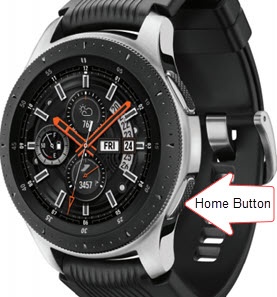
Samsung Galaxy Watch - Turn NFC On / Off
Here's how to turn NFC for your Galaxy Watch on or off.
Near Field Communication (NFC) allows the transfer of data between devices that are a few centimeters apart, typically back-to-back.
- From your Android™ smartphone, ensure your Galaxy Watch software is up to date as the steps below apply to the most recent version.
- Currently, the NFC option is not available on the watch when paired with any Apple® iPhone®.
- Near Field Communication (NFC) allows the transferring of data between devices that are a few centimeters apart, typically back-to-back. NFC must be enabled for NFC-based apps (e.g., Android Beam) to function correctly.
- From the watch screen, press theHome buttonto open the apps screen.
- TapSettings
.
- TapConnections.
- TapNFC.
- Tap theNFC switchto turn on
or off
.