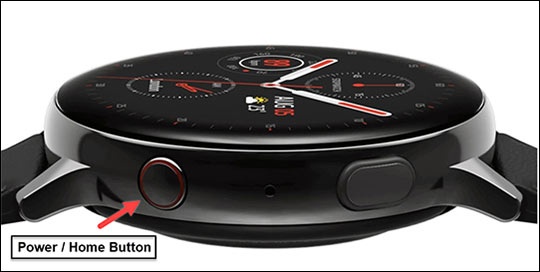
Samsung Galaxy Watch Active2 - Factory Data Reset (Powered Off)
Here's how to factory / hard reset your Galaxy Watch Active2 if the screen freezes or call, app, audio or sync issues occur and the device won't start up.
Performing a factory data reset removes all data from the device. Only perform a reset if absolutely necessary.
Read these instructions in their entirety before attempting.
- Ensure your watch is powered off.If your device is responsive and can be powered on, the preferred reset method should be performed.
- Press and hold thePower / Home button(right-edge) until 'Rebooting' appears at the bottom of the screen then release.
- Press thePower / Home buttonrepeatedly until the 'Select REBOOT MODE' screen appears.
- SelectRecovery.Press the Power button to cycle through options.
- When 'Recovery' is highlighted as seen in the image above, press and hold thePower / Home buttonuntil the device reboots again.Allow several minutes for the reboot process to complete.If applicable, set up your device.