Stream TV - Bluetooth Discovery Mode
Here's how to make your 2nd-generation Stream TV visible to Bluetooth devices.
If you need to make your 2nd-generation Stream TV visible to other Bluetooth® devices for pairing, follow these step-by-step instructions.
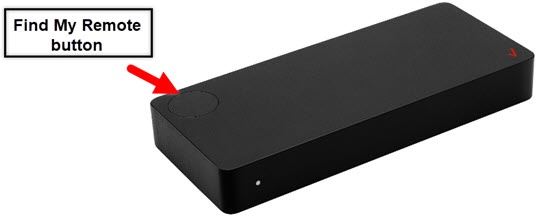
- The steps below apply to the 2nd-generation Stream TV which can be identified by the Find My Remote button. If you have the original Stream TV model, refer to Stream TV - Bluetooth Discovery Mode.
- Ensure your Stream TV is up to date as the following steps apply to the most recent version.
- If necessary, press theHome button
on your Stream TV remote to wake up your device.
- From the Stream TV Home screen, select theSettings menu
(upper-right).
Utilize 5-way navigation pad on the remote to highlight and the center (OK) button to select. - SelectAndroid TV settingsthen selectRemote & Accessories.
- SelectAdd accessory.The device is visible to nearby devices while the 'Searching for accessories' screen is open.
For additional info on Stream TV, check out the Stream TV support page.