Stream TV - Remove Google Account
Removing a Gmail™ (Google™) account from your 2nd-generation Stream TV can be helpful when switching accounts, troubleshooting login or email sync issues, or ensuring your data stays private.
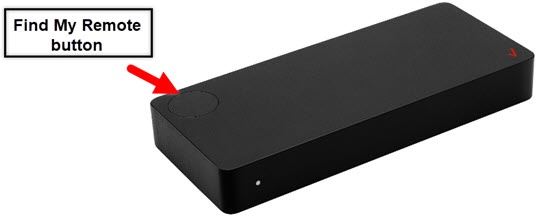
- The steps below apply to the 2nd-generation Stream TV which can be identified by the Find My Remote button. If you have the original Stream TV model, refer to Stream TV - Remove Google Account.
- Ensure your Stream TV is up to date as the following steps apply to the most recent version.
- If necessary, press theHome buttonon your Stream TV remote to wake up your device.
- From the Stream TV Home screen, select theSettings menu.Utilize 5-way navigation pad on the remote to highlight and the center (OK) button to select.
- Navigate:.
- Select the applicable account.
- SelectRemove account.
- To confirm, selectOK.
For additional info, see this Stream TV support page.