Arlo Go 2 LTE Security Camera Activate / Set Up Device
Arlo Go 2 LTE Security Camera
Activate / Set Up DeviceGet your security camera up and running to start monitoring your space. Quickly activate and set up your Arlo Go 2 LTE Security Camera by syncing it with your smartphone or computer.
Before you begin
To set up your camera, you need:
- an active SIM card inserted into the camera.
- access to a computer or smartphone with Internet access.
For smartphones, the Arlo app is needed and iOS 15.0 or higher or Android 9.0 or higher.
For computers, the Arlo web portal doesn't support Internet Explorer®. For more info visit Arlo system requirements.
Steps
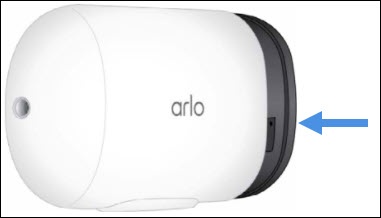
- Insert the battery but do not slide the camera into the protective housing.
- Open the Arlo app or navigate to the Arlo web portal at https://arlo.com/ via a browser.
- Do one of the following:
- If setting up a new Arlo account, selectCreate Accountthen follow the onscreen steps to sign up for an Arlo account.
- If you already have an Arlo account, enter your credentials then selectLog In.
- If necessary, selectDevices.
- Select theAdd iconorAdd New Device.
- From the Cameras section, selectGo2.If Go2 isn't visible, selectOthersthen selectGo2.
- Review the Meet your Arlo Go2 screen then selectContinue.
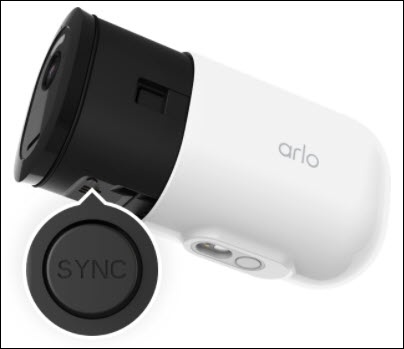
- Press and hold theSync buttonon the device for about 2 seconds.When released, the LED light should blink blue.
- If prompted with steps to insert your SIM and battery, selectContinue.If using the app, swipe the screen right to left until Continue appears.
- SelectContinueto confirm the LED light is blinking blue.If the light is no longer blinking, repeat step 7.
- Aim your camera lens 4 to 8 inches in front of the QR code displayed onscreen until a chime is heard.
- If you heard the chime sound, selectContinue.Allow several seconds for the camera to be discovered.If the chime sound wasn't heard, selectI didn't hear a chimeto review the Arlo tips then repeat steps 7 through 10.
- Once the camera is discovered, slide the camera into the protective housing until it clicks.
- From the Name your Arlo Camera screen, enter the desired camera name and time zone then selectContinue.
- From the Position your Arlo Camera screen, selectContinue.
- From the Your Arlo Camera is now active screen, selectFinish.