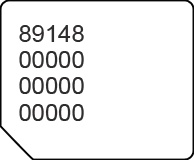
Arlo Go 2 LTE Security Camera - View SIM Card Number
Here's how to view the SIM card number associated with your Arlo Go 2 security camera.
- Open the Arlo app or navigate and sign in to the Arlo web portal at https://arlo.netgear.com/ via a browser.The Arlo web portal doesn't support Internet Explorer®. For more info visit Arlo system requirements.If necessary, install the Arlo app.
- From the Devices tab, tap or click theSettings icon
(to the right of the desired camera name).
- Tap or clickConnected to.
- TapCellular Network(in the app) or clickCellular Settings(on the web portal).
- View the ICCID (SIM card number).
You can also remove the SIM card and view the 20-digit SIM card number (with the gold contacts facing away).