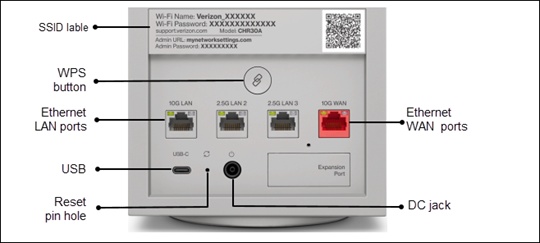
Wi-Fi Access Point Restore Settings to Factory Defaults
Wi-Fi Access Point
Restore Settings to Factory DefaultsReset your Wi-Fi Access Point to factory settings as a final troubleshooting step, or to reconnect it to a new router.
Before you begin
A reset to factory default deletes all changes made to the configuration and connected clients (e.g., Network Name (SSID), Wi-Fi/Admin Password, etc.) need to reconnect.
Restore via Device
- On the back of the Wi-Fi Access Point, locate theReset pin hole.
- Insert a paper clip into theReset pin holefor at least 10 seconds with the Wi-Fi Access Point powered on.