Inseego MiFi X PRO 5G UW - View Network Name and Password
To view the Wi-Fi name and passwords for your Inseego MiFi X PRO 5G UW, see this info.
This may help if you're having issues connecting to Wi-Fi.
- Wi-Fi Name / SSID: The name that identifies the wireless network.
- Wi-Fi Password: The password needed to connect to the Wi-Fi network.
- Admin Password: The password needed to access the Admin Web Interface and make changes to default Wi-Fi settings.
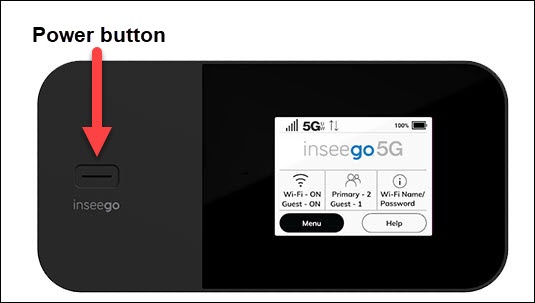
- From the Home screen on your Inseego MiFi® X PRO 5G UW, tapWi-Fi Name/Password
.
If necessary, press thePower buttonto turn on the display. - View the name and password.If not visible, the Display Wi-Fi Name and Password options can be enabled via the Admin Web Interface.
- Swipe left then view the name and password for the guest network.
You can also view the Wi-Fi name and password via the Admin Web Interface by navigating: .