What families need to know about Verizon Family Plus
Keeping up with the family—and keeping them safe online—just got easier. Verizon Family Plus brings Parental Controls, location tools, Driving Insights and more into one app.

At a glance
- Manage your family’s changing tech needs in one app. Verizon Family Plus brings Gizmo Watch management, phone Parental Controls, location sharing and Driving Insights into one app.
- Adjust the settings as they gain independence. Set content filters, screen-time schedules and location alerts for a first phone, then use driving reports to talk about safer habits when they get the car keys.
- Keep support available beyond the teen years. Roadside Assistance, 24/7 Assist for adults and a Family Line number that rings up to five smartphones help the whole family stay connected and get help.
Parenting hasn’t changed. But the devices definitely have. Your kid might start out with a watch. Then a phone. Then one day they’re asking for the car keys.
Verizon Family Plus can help you through all of those stages. It builds on the free Verizon Family app as a family location sharing app with additional tools for Parental Controls, driving safety and support for family members as their needs change.
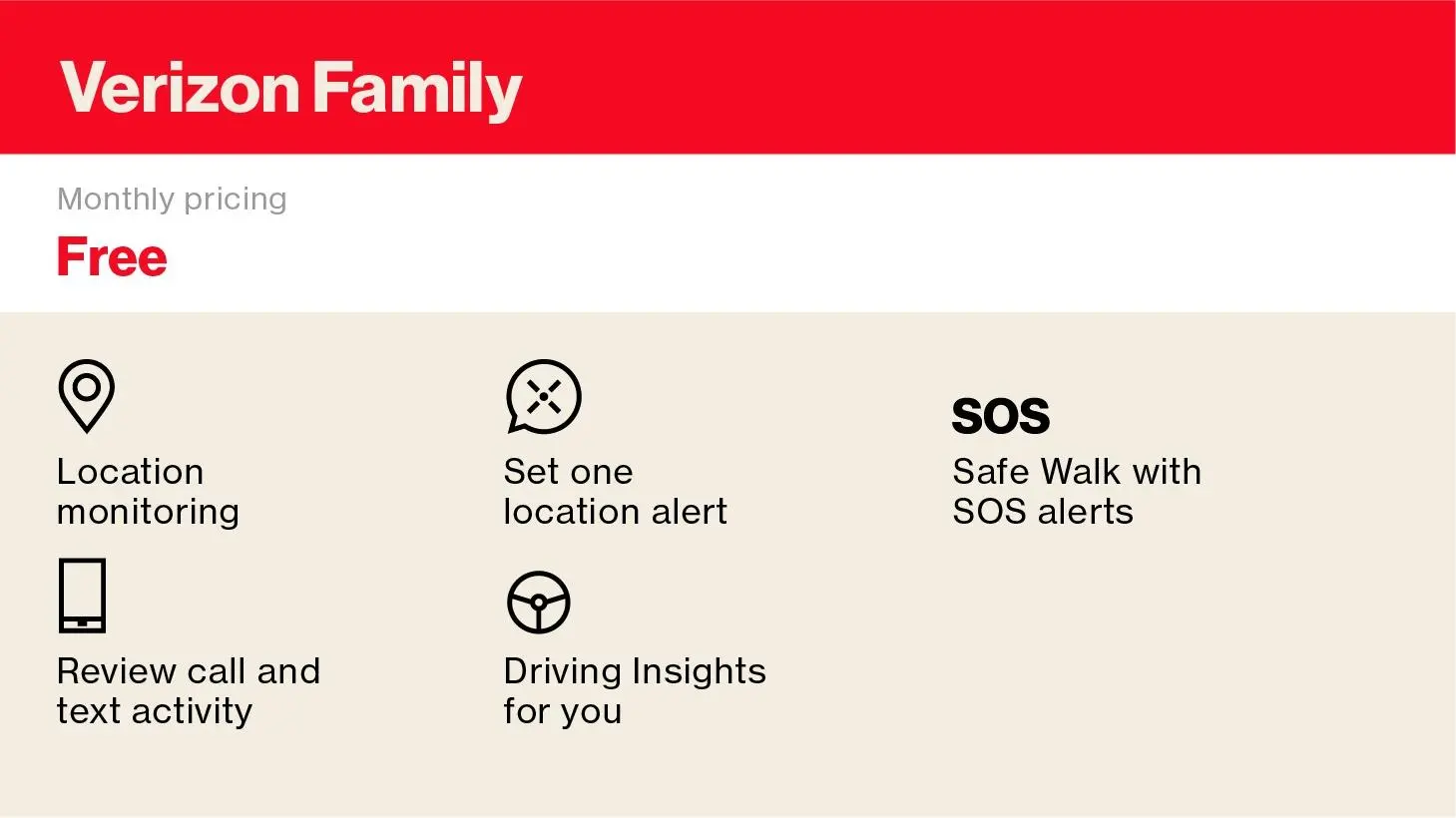
What is the difference between Verizon Family and Verizon Family Plus?
The free version of Verizon Family lets you do things like check a family member’s location, set one GPS boundary alert and check who they’re texting over the Verizon network.
The “Plus” in Verizon Family Plus helps you set digital boundaries. It includes:
Family stage | Verizon Family Plus features that fit |
The first smart watch | Gizmo Watches are now managed through the Verizon Family app, so parents can manage the watch alongside other family devices. |
More independence | Multiple GPS location and boundary alerts can help parents know when kids arrive at or leave familiar places. |
First phones and internet safety | Ability to pause their internet access Content filters that can be adjusted as kids grow Contact monitoring and blocking that can help parents stay aware of Verizon call and text activity and manage who can make contact |
New drivers and the nerves that come with it | Driving Insights for drivers in the family Speed threshold so parents can receive a push notification when a set speed is exceeded Roadside Assistance allows up to four events per membership year and accounts for situations like a tow, jump-start, flat tire or fuel delivery |
Older family members who may want extra support | 24/7 Assist gives users 18 and older access to live agents during medical or unsafe outdoor-walk situations, with the ability to involve emergency contacts or emergency services when appropriate. |
When no one wants to miss a call | Family Line provides one shared number that can ring across up to five designated family smartphones, making it easier for schools, doctors, deliveries or other important callers to reach someone. |
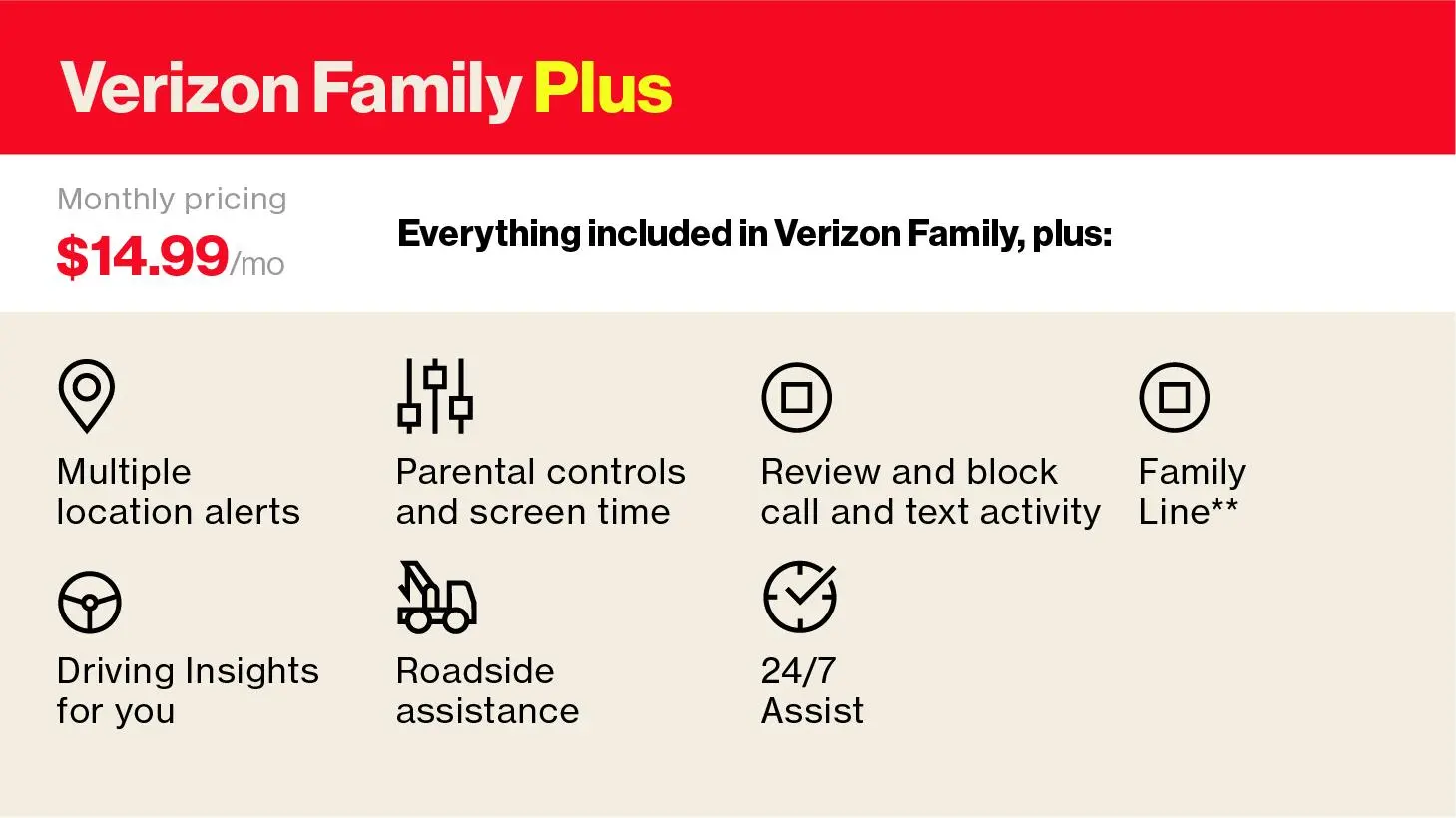
** Add’l taxes, fee and surcharges may apply and can vary when opting-in to Family Line.
How much does it cost?
The Verizon Family service is free and lets you review Verizon call and text activity, location sharing and Driving Insights for your own driving.
For $14.99 a month, Verizon Family Plus adds premium features—such as expanded parental controls, Roadside Assistance for other family members and insights about your kid’s driving.
If you added or switched to Unlimited Ultimate on or after May 7, 2026, Verizon Family Plus is included—just add and activate the perk in My Verizon. With Unlimited Plus, Unlimited Welcome, Simplicity or the older Ultimate plan, you can add it for $10 a month. Other qualifying plans pay $14.99 a month.

Why parents like Verizon Family Plus
Multiple location and boundary alerts, because “omw” is up for interpretation. Giving kids more independence doesn’t mean you stop wondering if they made it to swim practice.
The free Verizon Family app includes one GPS boundary alert. Verizon Family Plus lets parents create multiple alerts, so you can know when they get to school, practice, work or the mall for that “quick” trip.
Parental controls that change when your kid does. The phone rules they have at 13 probably won’t be the same at 16. Parents can set automatic screen time schedules; block apps; and pause internet access at bedtime or during school, homework time. You can tighten things up for a first-time phone user, then adjust those settings as they show they can handle more independence.
Parents can also use Safe Search and age-based content filters, then customize what’s allowed and what isn’t. Maybe your 10-year-old needs coding sites but not access to social networks like TikTok. Maybe your teenager needs to access digital content (say, on YouTube) for homework, but gaming does not need to be available around the clock.

Driver Insights, because letting teens drive is a new level of stress. Once your kid starts driving, the questions change fast. Did they get there? Were they speeding? Was there hard braking? And what exactly does “I drive fine” mean?
Verizon Family Plus shows a post-ride report, indicating if they drive too fast, brake too hard or get in an accident. (You can get insights into your own driving, too.) With an active Verizon Family Plus plan, all your family‑account members get up to four Roadside Assistance events per membership year, covering things like a tow, flat‑tire help, a jump‑start or fuel delivery through the app.
Parents can also set a speed threshold and receive a push notification when that threshold is exceeded. The alert is best treated as information for a later conversation—not a reason to call a teen while they’re still behind the wheel.
Crash detection means you get an alert if they’re in an accident (not every trip event or crash will be detected, and crash alerts do not automatically contact 911), so you can be the first to check in. And you can still get those insights even if they’re a passenger, so you can find out if their friends or ride-share drivers are driving safely too.
Added support doesn’t stop when kids turn 18. Family safety doesn’t suddenly become irrelevant on somebody’s 18th birthday. 24/7 Assist gives eligible users age 18 and older access to live agents during certain medical or unsafe outdoor-walk situations. Depending on the situation, an agent can involve emergency contacts or emergency services.
That could be useful for a college-age child walking home, an adult family member who lives alone or anyone in the family who would appreciate another way to ask for help.
Family Line, a shared number for critical calls. Family Line** offers a shared number that can ring up to five specific smartphones you choose, all at the same time. Managing your family’s schedule is already a juggling act, and missed calls from schools, doctors or deliveries shouldn’t go unanswered just because one parent is busy.
One app that can grow with the family.
The technology changes. So does the kind of support families need. Because the goal isn’t to hover forever. It’s to stay connected while giving them more room to go.
Keeping up with the whole family just got easier with Verizon Family Plus.
Learn more about our Verizon Loyalty Program for all.

