A parent’s guide to using voice search to boost kids’ learning
Kids can ask anything and devices will answer. With the right direction, parents can help kids use voice-activated devices to create meaningful learning moments. Here’s how.

“Are lions all around the world, or are they specifically in Africa natively? And if not, where are they?”
That’s the question Abby Moise, 12, asked a smart speaker one afternoon at home. It’s thoughtful and curious, but the device didn’t provide the answer Abby was looking for. “It just said it didn’t understand,” Abby told her mom, cognitive specialist Bea Moise.
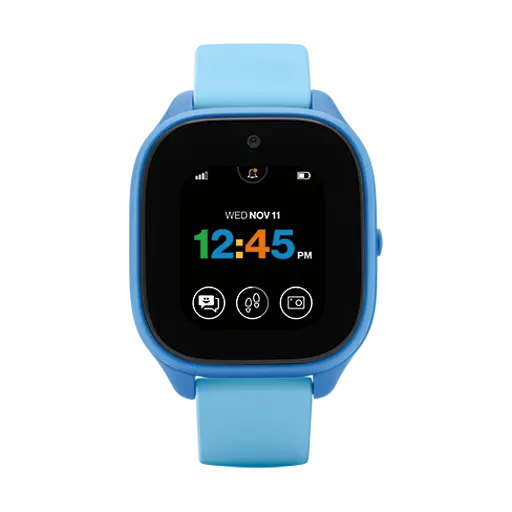
This is where more families find themselves today. Voice-activated search and texts are accessible through smart speakers, TVs, remotes and kid-friendly smartwatches like the Gizmo Watch 3. Kids are growing up in a world where asking questions out loud is often easier and faster than typing, spelling or scrolling.
What does the rise in voice search mean for how kids learn? And how can parents guide those voice interactions safely?
What kids gain from voice search
Voice-activated search doesn’t require screens and can help kids who are just learning to read. Plus, it immediately rewards curiosity, Moise says. Kids can ask questions and get answers in the moment without the need to pull out a device and type.
The key, Moise says, is for adults to be nearby to support, not just to rephrase the question. “Adults tend to cut to the chase,” she says. The temptation for parents is to step in and shorten the question or rephrase to get the answer kids want. The risk is that stepping in can edit out the natural curiosity that kids have.
How parents can turn voice search into teachable moments
Parents can turn voice search into teachable moments in three key ways: by slowing down, letting your child lead and turning answers into action. It can help to think of voice assistants as starting points, not endpoints. Here’s what that looks like.
1. Slow it down. If a device doesn’t understand a child, pause before stepping in. Is there a clarity issue, or is the question too long?
Instead of asking the question for your child, consider these talking points to help guide your child:
- “Let’s pause for a second.”
- “What’s the most important part of your question?”
- “What’s another way we could ask that?”
2. Let your child lead. Try not to control the conversation or answer the questions. Let their natural curiosity lead the questions and discussion with the voice assistant.
You can use those voice-assistant interactions as a jumping off point for deeper conversation. After the voice search, consider asking your child:
- “What made you think of that?”
- “What did you think the answer might be?”
- “What would you ask next?”
3. Turn answers into action. For example, if a child asks a device how plants grow, don’t stop after the search results are shared. Take the answer outside and talk about the plants you see. Plant something. Or draw a plant.
After your child gets an answer, consider asking these questions to think up some action you can take together:
- “How could we test that?”
- “What could we build, draw or try to see for ourselves?”
- “Should we try this outside and see what happens?”
4. Ask them what they learned. Consider asking follow-up questions like “What did you learn?” or “Do you agree with what you heard?”
Some questions to consider:
- “What did you learn from that answer?”
- “Do you agree with it? Why or why not?”
- “How do we know that’s true?”
How to use voice search safely
The most effective voice search safety features live on the devices themselves. Many voice assistants offer child safety modes and parental controls on the device that limit topics, filter responses and shape how conversations work. These controls are more precise than general internet filters and should be turned on.
Kids’ devices, like the Gizmo Watch 3, are even more locked down by design. You can see a transcript of their questions. Questions are limited; sensitive topics are blocked; and responses are intentionally narrow. It may feel restrictive, but that’s part of keeping answers age-appropriate.
Many smart speakers and assistants let parents see a text transcript of what a child asked and how the device responded, says Ethan Arenson, Head of Digital Safety at Verizon. It takes time to review, but it’s one of the clearest ways to understand how a child is using the technology and an early signal if conversations drift into areas you’re not comfortable with.
Beyond filters and transcripts, parents need to consider where devices are placed. Many smart devices now include screens, cameras and always-on microphones. Before placing voice-activated devices in common areas or bedrooms, parents should decide:
- Are you comfortable with a microphone in this location? Or a camera?
- Will news headlines appear on a screen? If so, is the location appropriate for that?
- Are personal photos shared onscreen?
Many voice-activated device features can be turned off or filtered, but they require parents to actively choose rather than rely on defaults.
Parents: Prioritize experience, not just search
Many kids growing up today will learn to search before they learn to type. And parents need to know the value of going beyond what the devices can share.
Voice search devices can offer facts, but they can’t replace lived learning, mistakes or shared discovery. “Technology is information,” Moise says. “Experience is something else entirely.”
Parents should be close enough to help shape questions without impacting curiosity—and then should model what to do with the answers once they’re shared.
We got you: You’re there for them with Verizon Family. Verizon’s there for you—including our 3-year price lock*.
*Learn more about our 3-year price lock guarantee.