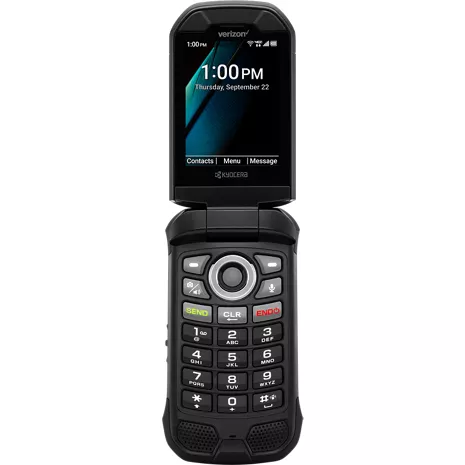
Kyocera DuraXV Extreme+ Non Camera Prepaid
Reviews
2.8
16 reviews
50% of reviewers recommend this product.
besat phone ever
awsome . 6 months ago
Good phone
Danig4ever . 1 year ago
- IP68 dust proof and waterproof rated for up to 30 minutes in up to 6.5 feet of water. Drop proof up to 1.5m onto concrete.
- SOS and PTT require subscription.

Reliable communication.

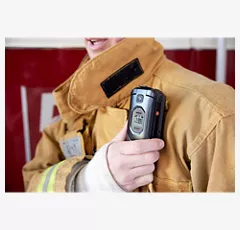
Designed for demanding environments.
Easy to use.

Compact and reliable.
Reliable communication.
Designed for demanding environments.
Design
Depth
1.07 in.
Color
Black
Width
2.22 in.
Length
4.36 in.
Height
4.36 in.
Charging Port
USB Type-C / High-speed USB 2.0
ECO-Certifications
Green By Design
Weight
6.8 oz.
Notable Materials
Flip
Accessibility
Auditory
Readout, Speech Rate and Speech Pitch, Persistent Alerts, Captions, Mono Audio, Sound Balance, Real Time Text, Vibrate for Calls / Alerts / Alarms, Volume Control, LED Flash for Alerts
Mobility
Voice Command, Vibrate for Calls / Alerts / Alarms, Vibration Intensity, Persistent Alerts, Physical Keys, Programmable Keys
HAC
M4 / T4, Hearing Aid / Telecoil Mode
Visual
Readout, Speech Rate and Speech Pitch, Font Size, Color Inversion, Color Correction, Vibrate for Calls / Alerts / Alarms, Vibration Intensity, Brightness Level, Tactile bumps on the keypad number "5" key, Braille User Guide available upon request
Battery
Standby Time
420 hrs
mAh (per hour)
1770 mAh (Removable)
Usage Time
56.08 hrs
Powershare
No
Fast Charge
No
Wireless Charging
No
Network
4G
UMTS: B5, B2, B1 (850, 1900, 2100MHz) LTE, Category 4: B12, B13, B5, B4, B2 (700a, 700c, 850, 1700, 1900MHz)
Wi-fi
Yes, MT6631N 802.11 a/b/g/n/r/k/ac (2.4&5GHz)
SAR
Head: 0.75 W/kg | Body-worn: 1.13 W/kg (at 0.59 inches, 1.5 cm) | Hotspot: 1.16 W/kg
Global & Roaming Network
Yes
FCC ID
V65E4811
World Device
No
Performance
Bluetooth
BT 5.1 +LE/EDR
Processor
MediaTek MT6761V/WB 2.0GHz x 3 Core A53
OS
Android Q (AOSP)
Expandable Memory
Yes | microSDXC up to 512GB
Memory/Storage
2GB/16GB
Hotspot
Yes (2.4GHz), <10 devices>
Display
Screen Size
Main: 2.6 inches | Sub: 1.08 inches
Refresh Rate
Main: 60Hz | Sub: 60Hz
Screen Type
Main: TFT LCD | Sub: monochrome OLED
Aspect Ratio
Main: 320 x 240 (4:3) | Sub: 102 x 90
SKU#
SKU#
KYOE4811NC
What's in the box
- DuraXV Extreme +
- Pre-Installed SIM Card
- AC Adapter
- Lithium Ion Battery (Removable)
- USB Type-C Cable
- Literature
- IP68 dust proof and waterproof rated for up to 30 minutes in up to 6.5 feet of water. Drop proof up to 1.5m onto concrete.
- SOS and PTT require subscription.
Kyocera DuraXV Extreme+ Non Camera Prepaid Reviews
2.8
16 reviews
50% of reviewers recommend this product.
besat phone ever
awsome . 6 months ago
Good phone
Danig4ever . 1 year ago
This series of phone has been a workhorse for me for many years!
Ken Yy . 1 year ago
Kyocera Customer Support - 1 year ago
Kyocera Mobile is happy to support personal and business privacy requirements with our ultra-rugged, easy-to-use, non-camera, TAA-compliant flip phones. Thanks for your purchase. We appreciate your positive review!
Died after 13 months, - 1 month after warranty expired
myself1 . 2 years ago
Kyocera Customer Support - 2 years ago
We're sorry to hear about the troubles you have had with your phone and battery. If you did not purchase your replacement battery from Kyocera's online Solutions Store, you probably did not get an authentic battery, which would explain why it did not solve the problem. Additionally, DuraXV Extreme+ comes with Kyocera’s Standard 2-Year Manufacturer’s Warranty, not a one-year warranty. Please contact our customer support team at 1-800-349-4478, or online at kyoceramobile.com/contactus/support/, to describe the problem and they will assist you. When you contact them, please have your phone's IMEI ready to provide to them.
Keeps me humble and alive…
JPoon6869 . 2 years ago
Not good for older people
Yes sir . 2 years ago
Kyocera Customer Support - 2 years ago
Thank you for your feedback on DuraXV Extreme+. Here are a couple of tips that might help you make calls faster. First, you can get to the Contacts list quickly from the home screen by pressing the left softkey (in the upper left corner of the keypad). This will open the Contacts list and you can scroll to the contact or start entering the letters of the name to narrow the list. Second, for people you want to call quickly, you can add their contact to the Speed Dial list. To do this: 1) Go to Settings::Call settings::Speed dial setup. 2) Press the left softkey to add a speed dial entry. 3) Enter the speed dial number which is the number you want to press in order to call that person. (The number 1 is already reserved for voicemail.) 4) Press the left softkey to set the contact name. 5) Select the contact from the list and press the center navigation key to choose that one. 5) Press the center navigation key again to save the speed dial entry. 6) Press the End key to return to the home screen. After this, when you are on the home screen, you can press and hold the number key for the speed dial number of the person you want to call. For example, you would press and hold 3 to call the contact in speed dial 3. For speed dial 12, you would press 1, then press and hold 2. For more tips about your phone or to get a copy of the user guide, contact our customer support team at 1-800-349-4478.
No camera this is what’s available
Abcd . 3 years ago
Kyocera DuraXV Extreme+ Non Camera Prepaid FAQs
Beardown . Mar 7, 2026
Does it support parental locks to turn off or restrict internet and apps?
DuraXV Extreme+ comes with a feature called Device Control which can be used to hide apps like the browser and email, and to disable data access. This may meet your needs if you are technically savvy and have some time to configure the phone. The feature can be found under Settings&tools->Business tools->Device Control. Here is a link to information about how to use this Device Control feature. The "How To" guide includes an example called "How to Hide unwanted Apps." kyoceramobile.com/device-control/feature-phones
Yes, you can disable internet apps by using the built-in Device Control features which offers basic parental control tools. -Necia
John . Mar 3, 2026
I'd like this with no camera, no texting and no internet. IIs this possible?
DuraXV Extreme+ Non-Camera (E4811NC) does not have a camera and it comes with a feature called Device Control which can be used to hide apps like the browser and email, and to disable data access. This may meet your needs if you are technically savvy and have some time to configure the phone. The feature can be found under Settings&tools->Business tools->Device Control. Here is a link to information about how to use this Device Control feature. The "How To" guide includes an example called "How to Hide unwanted Apps." kyoceramobile.com/device-control/feature-phones
No, if you link the service to a network, it will gain access to text and the internet. -Nikki
Melissa . Feb 27, 2026
Is there a camera
DuraXV Extreme+ Non-Camera (E4811NC) does not have a camera. The alternate version DuraXV Extreme+ (E4811) does come with a camera.
No. -Cryssie
Ma GB . Dec 17, 2025
Does it have a camera
DuraXV Extreme+ Non-Camera (E4811NC) does not have a camera. The alternate version DuraXV Extreme+ (E4811) does come with a camera.
This model does not have a camera. ~Maria
Melody . Dec 9, 2025
Does the phone come unlocked
All phones are locked for 60 days after purchase. For more information visit: https://www.verizon.com/about/consumer-safety/device-unlocking-policy -Dee
curtis Nile . Oct 8, 2025
Does this phone have talk to text....
DuraXV Extreme+ does not have built-in support for talk-to-text. However, some users have reported in online forums that they have been able to sideload the "Voice Access" app by Google and successfully used that for talk-to-text.
No, the Kyocera DuraXV Extreme+ Non Camera does not have talk-to-text for sending messages ~Joe M
Jane . Aug 9, 2025
Does this have internet?
Yes, the Kyocera DuraXV Extreme+ (Non-Camera) does have internet access. It supports 4G LTE connectivity and Wi-Fi.~Joe M
Jane . Aug 9, 2025
Does this have internet?
Yes, the Dura XV Extreme+ does have internet access through its built-in browser. -Joe
Josh . Jun 23, 2025
Does it have wifi calling?
Yes, Wi-Fi Calling can be activated within the Call Settings for this device. You can navigate to this option from the Idle screen by pressing the Center soft key [Menu] > Settings & tools > Settings > Call Settings. -James
Purple . May 25, 2025
Does it have Internet app?
Yes, DuraXV Extreme+ does provide internet connectivity via a built-in browser. It can, however, be disabled if required.
Yes, there is a proprietary app store for basic smartphones but does not have the same apps selection as Google Play. -Nikki