Samsung Galaxy Watch Ultra 2025 Prepaid
Reviews
4.7
2527 reviews
89% of reviewers recommend this product.
Quality
Babi21 . 18 hours ago
Samsung US Originally posted on Samsung US
Durable smartwatch with powerful health features
Hamadeen . 1 day ago
Samsung US Originally posted on Samsung US
- Galaxy AI features track data and require compatible Samsung Galaxy phone, Samsung Health app and Samsung account.
- Based on typical use; results may vary.
- Gemini mobile app available on select devices, languages, and countries. Requires compatible Wear OS watch to be connected to a compatible device. Check responses for accuracy. Internet connection and set up may be required. Features may differ depending on subscription and account. Results for illustrative purposes and may vary. Google and Gemini are trademarks of Google LLC.
- Requires network connection to notify emergency contact, GPS accuracy may be affected by obstructions to satellite signal such as buildings.
- To activate, press Quick Button for five seconds; to deactivate, press for three seconds.
- Must wear watch for 3 consecutive nights and set optimal wake up time in the Samsung Health app.
- Requires establishing your initial base line by wearing watch while sleeping for 3 nights (within a 2-week period). The Vascular Load software function is not intended for use in the diagnosis of disease or other conditions, or in the cure, mitigation, treatment or prevention of disease. Not intended for medical use.
- Not intended for medical use.
- Track Back feature leads back to the start of trail for hiking or cycling. Option is only available if you have tracked your route.
- Based on typical use; results may vary.
- Must be signed into your Samsung and Google accounts, and be connected to the internet directly (by Wi-Fi or LTE model) or via a compatible Samsung Galaxy AI phone.
- 4G LTE stand-alone connectivity only available on Samsung Galaxy Watch7 LTE / Galaxy Watch Ultra versions. Requires initial pairing with an eligible Android smartphone and separate qualifying wireless plan. Your carrier may not support stand-alone voice calling, or support may be available only in certain areas. Please check with your carrier for more information. Stand-alone functionality limited if paired phone is not powered on or connected to a wireless network. Available for outdoor running only; requires at least 12 minutes of running with GPS on and initial setup. Galaxy AI features track data and require compatible Samsung Galaxy phone, Samsung Health app and Samsung account. These software functions are not intended for use in the diagnosis of disease or other conditions, or in the cure, mitigation, treatment or prevention of disease.

A battery built for endurance.

Customizable Quick Button.

An intuitive assistant, right on your wrist.

Your adventure starts the night before.

One simple number. A world of insights.

Built for the long run.
A battery built for endurance.
Customizable Quick Button.
Design
Finishes
Titanium
Depth
0.48 in
Width
1.85 in
Height
1.87 in
Charging Port
Wireless
Colors
Titanium Gray, Titanium White, Titanium Silver, Titanium Blue
Weight
2.13 oz
Notable Materials
Titanium
Bands
LTE: 1, 2, 3, 4, 5, 7, 8, 12, 14, 13, 18, 19, 20, 25, 26, 28, 40, 66, 71
Accessibility
Auditory
Real-Time Text, TalkBack
Voice Assistant
Google Assistant, Bixby
Mobility
N/A
HAC
N
Visual
High contrast fonts, Magnification, Font size, Bold Font, Color correction, Color inversion
Battery
Standby Time
Up to 110 hrs
mAh (per hour)
590mAh
Usage Time
Up to 48 hours
Network
4G
LTE: 1, 2, 3, 4, 5, 7, 8, 12, 13, 14, 18, 19, 20, 25, 26, 28, 40, 66, 71
Wi-fi
S5E5535, 802.11 a/b/g/n
Number Share Eligible
Y
SAR
47MM: Head: 0.20 W/Kg (Simul: 0.26 W/Kg), Wrist 0.42 W/Kg (Simul: 0.74 W/Kg)
FCC ID
A3LSML705
Global & Roaming Network
N
World Device
No
Additional Features
Prop 65 Warning
Reproductive Harm
Performance
Processor
Exynos W1000 (1.6GHz/1.5GHz)
OS
Wear OS 6.0
Memory/Storage
RAM: 2.0GB, Flash: 64GB
Display
Type
sAMOLED
Size
1.47"
SKU#
SKU#
SML705UZBM
- Galaxy AI features track data and require compatible Samsung Galaxy phone, Samsung Health app and Samsung account.
- Based on typical use; results may vary.
- Gemini mobile app available on select devices, languages, and countries. Requires compatible Wear OS watch to be connected to a compatible device. Check responses for accuracy. Internet connection and set up may be required. Features may differ depending on subscription and account. Results for illustrative purposes and may vary. Google and Gemini are trademarks of Google LLC.
- Requires network connection to notify emergency contact, GPS accuracy may be affected by obstructions to satellite signal such as buildings.
- To activate, press Quick Button for five seconds; to deactivate, press for three seconds.
- Must wear watch for 3 consecutive nights and set optimal wake up time in the Samsung Health app.
- Requires establishing your initial base line by wearing watch while sleeping for 3 nights (within a 2-week period). The Vascular Load software function is not intended for use in the diagnosis of disease or other conditions, or in the cure, mitigation, treatment or prevention of disease. Not intended for medical use.
- Not intended for medical use.
- Track Back feature leads back to the start of trail for hiking or cycling. Option is only available if you have tracked your route.
- Based on typical use; results may vary.
- Must be signed into your Samsung and Google accounts, and be connected to the internet directly (by Wi-Fi or LTE model) or via a compatible Samsung Galaxy AI phone.
- 4G LTE stand-alone connectivity only available on Samsung Galaxy Watch7 LTE / Galaxy Watch Ultra versions. Requires initial pairing with an eligible Android smartphone and separate qualifying wireless plan. Your carrier may not support stand-alone voice calling, or support may be available only in certain areas. Please check with your carrier for more information. Stand-alone functionality limited if paired phone is not powered on or connected to a wireless network. Available for outdoor running only; requires at least 12 minutes of running with GPS on and initial setup. Galaxy AI features track data and require compatible Samsung Galaxy phone, Samsung Health app and Samsung account. These software functions are not intended for use in the diagnosis of disease or other conditions, or in the cure, mitigation, treatment or prevention of disease.
Samsung Galaxy Watch Ultra 2025 Prepaid Reviews
4.7
2527 reviews
89% of reviewers recommend this product.
Quality
Babi21 . 18 hours ago
Samsung US Originally posted on Samsung US
Durable smartwatch with powerful health features
Hamadeen . 1 day ago
Samsung US Originally posted on Samsung US
Galaxy Watch Ultra
KAM1 . 1 day ago
Samsung US Originally posted on Samsung US
modern style
helo123 . 1 day ago
Samsung US Originally posted on Samsung US
Gracias
Pjrosado . 1 day ago
Samsung US Originally posted on Samsung US
battery life not so good
Joel . 1 day ago
R&R Team - 1 day ago
Salutations Joel, Thank you for sharing your thoughts with us about your experience using the Samsung Galaxy Watch Ultra. We value your candor as we continue to improve the performance and functionality of our product line. Samsung provides a 12-month warranty on our products for manufacturing defects in materials and workmanship. The Galaxy Watch Ultra battery offers up to 100 hours in Power saving mode, up to 60 hours without Power Saving mode, and up to 48 hours in Exercise power saving mode. If you're experiencing less than expected battery life, please take a moment to review "Reduced battery life on your Samsung smart watch" to learn what factors, if any, may be impacting the life of your device. If you have any questions or if you would like any further assistance afterward, please do not hesitate to reach out to Samsung Support. Thank you for being a loyal Samsung customer. - Debra Samsung Support smsng.us/Samsung-Support Warranty Information smsng.us/Warranty-Info Facebook Messenger smsng.us/Facebook-Messenger X Messages https://smsng.us/X-Messages Samsung Community smsng.us/Samsung-Community Galaxy Watch Ultra Battery https://www.samsung.com/us/watches/galaxy-watch-ultra/#battery Reduced battery life on your Samsung smart watch https://www.samsung.com/us/support/troubleshooting/TSG01003232/Samsung US Originally posted on Samsung US
Not sure what yet.
Skullfit . 1 day ago
Samsung US Originally posted on Samsung US
The best watch
Kevin . 2 days ago
Samsung US Originally posted on Samsung US
Elite Health Tracking with Major Software Caveats
LCARSspecialist . 2 days ago
Samsung US Originally posted on Samsung US
My galaxy watch has been a great for me
M0MAK1M . 2 days ago
Samsung US Originally posted on Samsung US
Samsung Galaxy Watch Ultra 2025 Prepaid FAQs
Chuy . Mar 26, 2026
What material is the band made of?
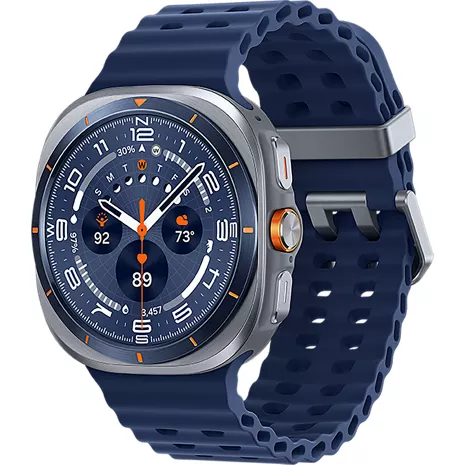
The Samsung Galaxy Watch Ultra bands available at Verizon Wireless primarily use Hydrogenated Nitrite Butadiene Rubber (HNBR) for the Marine Band, which is durable and designed for water sports. ~Maria
John l . Mar 25, 2026
How far is the maximum distance can the watch be from your phone to work
With Verizon cellular (LTE) active on a Samsung Galaxy Watch Ultra 2025, there is no maximum distance from your phone for basic functionality. -Will
Service . Mar 23, 2026
Do you have to have a plan to buy a watch? You cannot buy a Samsung Watch with no service?
For information about the plan, we suggest contacting our Customer Service team at https://www.verizon.com/digital/nsa/nos/ui/ngd/contactus.
Grocery Nate . Mar 22, 2026
Do I still have to connect the watch via Bluetooth to my phone?
Yes, Bluetooth is used to pair the watch with your phone. -Lauren
Mar 22, 2026
Do you take trade ins?
Learn more about our device trade-in program here: https://www.verizon.com/trade-in/ -Joseph
Dilly . Mar 20, 2026
Can you use it to activate the shutter on your camera From a distance?
Yes, you are able to control the shutter from the watch. ~Peter
Mike . Mar 19, 2026
What is the difference between the samsung ultra and the ultra 25
To compare phones visit: https://www.verizon.com/wireless-devices/smartphones/samsung-compare/ -Dee
Galaxy Watch Ultra 2025 . Mar 13, 2026
Is it waterproof?
The watch is water-resistant with a IP68 rating. -Dee
nikki . Mar 12, 2026
Is there a display protective cover for this watch
Yes, there are screen protectors that you can add to the watch.
LLOYD . Mar 7, 2026
can you set an alarm for the amount of bpm i.e. low or high beats per minute
Yes you can set limits. https://www.samsung.com/us/support/answer/ANS10003311/