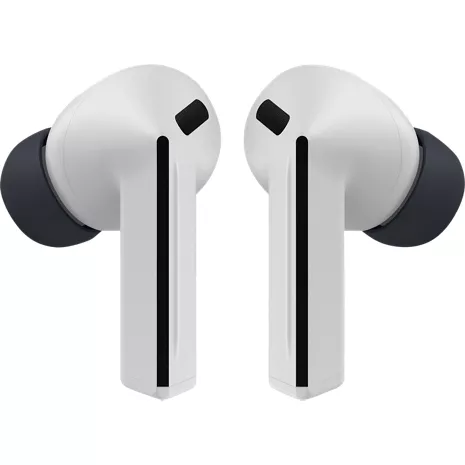
Samsung Galaxy Buds3 FE
Color
Price
$149.99
Quantity
Free returns within 30 days.Details
Get it fast
Free 2 Day Shipping
Free Express Pickup
Select a storeEnjoy a powerful listening experience with Galaxy Buds3 FE, designed to be used comfortably every day. Whether you're taking a call on the go or listening to your favorite music, the improved microphone,¹ enhanced ANC,¹,² crisp audio and powerful speakers give you the features you need for everything your day brings. Plus, enjoy hands-free access to Gemini³ in your Galaxy phone — just ask through your Galaxy Buds3 FE and get help on the go.
Outside noise? Not your problem.
Hear what you want and not what you don't with a stronger Active Noise Cancellation.¹,² And when you wish to enjoy your audio while staying aware of your surroundings, switch to the Ambient mode and you're set.
Your everyday sound, now more powerful.
Galaxy Buds3 FE packs a bigger¹ 11mm dynamic speaker with deep bass and Powerful Sound that make everything from daily commutes to weekend playlists sound amazing.
Every call, loud and clear.
Confidently hear and be heard on phone calls with family and friends thanks to the added microphone and enhanced background noise reduction¹ on Galaxy Buds3 FE.
Uninterrupted audio with a long-lasting battery.
Go long between charges with a long-lasting battery.4 And when it's time to recharge, do it quickly and get right back on track.
Talk to Gemini, hands-free.
With hands-free access to Gemini,³ smart assistance is always within earshot. No need to reach for your phone anymore as Galaxy Buds3 FE let you get help on the go just by using your voice.
Move between your Galaxy devices. Your Buds follow.
Seamlessly connect and switch between your Galaxy devices. Galaxy Buds3 FE pair5 effortlessly and automatically switch between your phone to Tab to PC, as per your needs.6
¹Compared to Galaxy Buds FE.
²Android phone with Wear app installed to access all features.
³Compatible with select apps. Requires Google Gemini account. Results may vary based on input; check responses for accuracy. Google and Gemini are trademarks of Google LLC.
4Up to 8.5 hours of uninterrupted play time with ANC off, and up to 30h total listening time with the case.
5Feature only supported on Galaxy devices and Galaxy Book Series PCs launched 2020 or later.
6Features supported on compatible Galaxy devices. Must be logged in to the same Samsung account and have Bluetooth and Wi-Fi turned on. Earbuds must be paired with your phone, Tab or PC at least once.
Reviews
4.4
82 reviews
25% of reviewers recommend this product.
Do not buy
Benpai74 . 3 days ago
R&R - 16 hours ago
Salutations Benpai74, Thank you for sharing your experience with the Galaxy Buds3 FE. These earbuds are designed to deliver clear sound and seamless Galaxy connectivity for daily use. Sound quality is key to enjoyment. When Active Noise Canceling, Adaptive, or Ambient Sound features are active, the sound from the sub-microphone, located on the top outer edge of your earbuds, is adjusted based on the noise control mode and transmitted through the speaker. However, covering or touching the area around the sub-microphone while putting on, removing, or adjusting your earbuds can cause the microphone to pick up sound, resulting in beeping or howling noises. Please make sure the sub-microphone isn't covered when these features are active. Refer to the online article linked below for more information about loopback and feedback, and how to avoid them. Thank you for being part of the Samsung community. Beeping or howling noise when holding the Galaxy Buds https://www.samsung.com/us/support/troubleshoot/TSG10003620/ -Ty Samsung Support smsng.us/Samsung-Support Samsung Community smsng.us/Samsung-Community Facebook smsng.us/Facebook-Messenger X https://smsng.us/X-MessagesSamsung US Originally posted on Samsung US
Very solid set of earbuds that are a great value
TonyYayo2424 . 9 days ago
R&R - 5 days ago
Hi there TonyYayo2424, Thank you for offering such a detailed perspective on the Galaxy Buds3 FE. It’s wonderful to learn how comfort, battery life, and Active Noise Cancellation integrate seamlessly into your Galaxy experience. Your insights on Live Translation serve as a practical example of how Galaxy features enhance daily interactions. We genuinely appreciate your feedback and thank you for being part of the Samsung community. -Ty Samsung Support smsng.us/Samsung-Support Samsung Community smsng.us/Samsung-Community Facebook smsng.us/Facebook-Messenger X https://smsng.us/X-MessagesSamsung US Originally posted on Samsung US
Features
- Designed to be used comfortably every day
- Improved microphone,¹ crisp audio and powerful speakers
- Enjoy hands-free access to Gemini³ on your Galaxy phone
- Enhanced Active Noise Cancellation.¹,²
- Ambient mode available
- Packs a bigger¹ 11mm dynamic speaker with deep bass
- Added microphone and enhanced background noise reduction¹
- Go long between charges with a long-lasting battery4
- Pair5 effortlessly and automatically switch between your phone to Tab to PC
SKU#
SKU#
SM-R420NZKAXAR
What's in the box
- Samsung Galaxy Buds3 FE
Samsung Galaxy Buds3 FE Reviews
4.4
82 reviews
25% of reviewers recommend this product.
Do not buy
Benpai74 . 3 days ago
R&R - 16 hours ago
Salutations Benpai74, Thank you for sharing your experience with the Galaxy Buds3 FE. These earbuds are designed to deliver clear sound and seamless Galaxy connectivity for daily use. Sound quality is key to enjoyment. When Active Noise Canceling, Adaptive, or Ambient Sound features are active, the sound from the sub-microphone, located on the top outer edge of your earbuds, is adjusted based on the noise control mode and transmitted through the speaker. However, covering or touching the area around the sub-microphone while putting on, removing, or adjusting your earbuds can cause the microphone to pick up sound, resulting in beeping or howling noises. Please make sure the sub-microphone isn't covered when these features are active. Refer to the online article linked below for more information about loopback and feedback, and how to avoid them. Thank you for being part of the Samsung community. Beeping or howling noise when holding the Galaxy Buds https://www.samsung.com/us/support/troubleshoot/TSG10003620/ -Ty Samsung Support smsng.us/Samsung-Support Samsung Community smsng.us/Samsung-Community Facebook smsng.us/Facebook-Messenger X https://smsng.us/X-MessagesSamsung US Originally posted on Samsung US
Very solid set of earbuds that are a great value
TonyYayo2424 . 9 days ago
R&R - 5 days ago
Hi there TonyYayo2424, Thank you for offering such a detailed perspective on the Galaxy Buds3 FE. It’s wonderful to learn how comfort, battery life, and Active Noise Cancellation integrate seamlessly into your Galaxy experience. Your insights on Live Translation serve as a practical example of how Galaxy features enhance daily interactions. We genuinely appreciate your feedback and thank you for being part of the Samsung community. -Ty Samsung Support smsng.us/Samsung-Support Samsung Community smsng.us/Samsung-Community Facebook smsng.us/Facebook-Messenger X https://smsng.us/X-MessagesSamsung US Originally posted on Samsung US
Good product
Brandon . 14 days ago
R&R - 13 days ago
Greetings Brandon, Thank you for sharing your experience with Galaxy Buds3 FE. Reliable connectivity, balanced sound, and comfortable wear contribute to an enjoyable listening experience. We appreciate your feedback and thank you for being part of the Samsung lineup. -Ty Samsung Support smsng.us/Samsung-Support Samsung Community smsng.us/Samsung-Community Facebook smsng.us/Facebook-Messenger X https://smsng.us/X-MessagesSamsung US Originally posted on Samsung US
Good sound, not great fit
LevelUp . 22 days ago
R&R - 21 days ago
Hiya LevelUp, We’re glad you’re enjoying the sound quality of your Galaxy Buds3 FE. For the best experience, proper fit is key; correct placement enhances sound clarity, provides comfort, and prevents earbuds from falling out. Incorrect wearing can cause discomfort, sound leakage, and earbuds falling out, especially during activities like jogging. Make sure you wear them properly. For tips on achieving the perfect fit with your Galaxy Buds FE, check the linked online article below. Your feedback on fit helps our design team improve ergonomic comfort, ensuring your listening experience remains excellent. Thank you for your review and for being part of the Samsung community. How to wear your Samsung Galaxy Buds3, Buds3 Pro, or Buds3 FE https://www.samsung.com/us/support/answer/ANS10003519/ -Ty Samsung Support smsng.us/Samsung-Support Samsung Community smsng.us/Samsung-Community Facebook smsng.us/Facebook-Messenger X https://smsng.us/X-MessagesSamsung US Originally posted on Samsung US
Earbud 3 pro
Jamie . 24 days ago
R&R - 21 days ago
Hi Jamie, Thank you for your insights on the Galaxy Buds3 FE. These earbuds are designed for clear sound and stylish comfort, and your feedback on fit will help improve future designs for secure wear and great sound during all activities. Proper fit is essential for several reasons: it enhances sound quality, increases comfort, and prevents the earbuds from falling out. Improper wearing can cause discomfort, sound leaks, and even loss of an earbud, especially while jogging. Make sure they fit well. The Galaxy Buds3 FE come with different-sized ear tips. First, select the correct size for your ears. They should sit snugly with no gaps, which helps prevent sound leaks and ensures optimal audio quality. For instructions on changing tips, refer to our guide. Also, look for the L and R marks at the bottom of the earbuds. Insert the R earbud into your right ear with the R facing you, and the L into your left ear with the L facing you. Tilt the stem slightly so the microphone points toward your mouth instead of downward. Adjust the buds by rotating them forward or back until they feel comfortable. You can also perform a fit test to confirm you have the right fit. Please find out more about how to achieve a good fit with your Galaxy Buds3 FE by checking out the online resource linked below. Thank you for your feedback and for being part of the Samsung family. How to wear your Samsung Galaxy Buds3, Buds3 Pro, or Buds3 FE https://www.samsung.com/us/support/answer/ANS10003519/ -Ty Samsung Support smsng.us/Samsung-Support Samsung Community smsng.us/Samsung-Community Facebook smsng.us/Facebook-Messenger X https://smsng.us/X-MessagesSamsung US Originally posted on Samsung US
Very dissatisfied
Lewis . 26 days ago
R&R - 24 days ago
Hi there Lewis, We appreciate your feedback on the Galaxy Buds3 FE. This model was designed for clear sound and easy connectivity in a lightweight form. Your comments on fit and comfort help shape our efforts to create even more secure and ergonomic earbud designs for future Galaxy audio products. Thank you for your feedback and for being a Samsung listener. -Ty Samsung Support smsng.us/Samsung-Support Samsung Community smsng.us/Samsung-Community Facebook smsng.us/Facebook-Messenger X https://smsng.us/X-MessagesSamsung US Originally posted on Samsung US
Value for money
Sim2999 . 28 days ago
Samsung US Originally posted on Samsung US
light weight, good battery, great audio
Bob627 . 29 days ago
R&R - 18 days ago
Hello there Bob627, Thank you for sharing what you like about Galaxy Buds3 FE. Built for all-day comfort, dependable battery life, and clear audio, these earbuds seamlessly connect with Galaxy AI for hands-free control. Many users enjoy staying aware of their environment while experiencing rich sound, making Galaxy Buds3 FE a versatile everyday companion. We appreciate your feedback and thank you for choosing Samsung audio. Use Active noise canceling on your Samsung Galaxy earbuds https://www.samsung.com/us/support/answer/ANS10001322/ -Ty Samsung Support smsng.us/Samsung-Support Samsung Community smsng.us/Samsung-Community Facebook smsng.us/Facebook-Messenger X https://smsng.us/X-MessagesSamsung US Originally posted on Samsung US
great!!!!!!!!
customer . 1 month ago
Samsung US Originally posted on Samsung US
All time favorite
Barbarajean . 1 month ago
Samsung US Originally posted on Samsung US
Samsung Galaxy Buds3 FE FAQs
There are no questions, be the first to ask one.