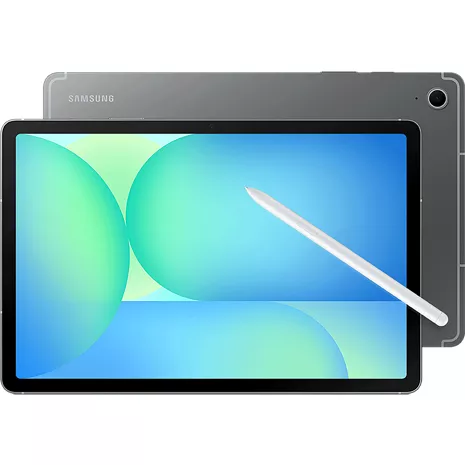
Gray
128 GB
4.5
528 undefined
87
Sara B . 3 days
Works well. Multiples options
Gabe25 . 4 days
Samsung US Originally posted on Samsung US
- 5G speeds vary and require optimal network and connection (factors include frequency, bandwidth, congestion); see carrier for availability.
- Measured diagonally, the Galaxy Tab S10 FE screen size is 10.9" in the full rectangle and 10.8" accounting for the rounded corners. Actual viewable area is less due to the rounded corners.
- Requires internet connection. Users may need to update Android and Google app to the latest version. Works on compatible apps and surfaces. Results may vary depending on visual matches. Accuracy of results is not guaranteed. Color and model availability may vary depending on country or carrier.
- Consistent with IP68 rating, water resistant in up to 5 feet of water for up to 30 minutes. Rinse residue / dry after wet.
- Samsung account login required and internet connection. Handwriting Assist is available for text in Note only (200-4,000 characters).
- Galaxy AI features by Samsung will be provided for free until the end of 2025 on supported Samsung Galaxy devices. Keyboard and AI Key function only compatible with Galaxy Tab S10 FE Series, Tab S10 Series, Tab S9 Series, Tab S9 FE Series models with One UI 7.0 or later.
- Based on average battery life under typical usage conditions. Average expected performance based on typical use. Actual battery life depends on factors such as network, features selected, frequency of calls, and voice, data, and other application usage patterns. Results may vary.
- Requires 45W wall charger (sold separately). Use only Samsung-approved charger and USB-C cable. To avoid injury or damage to your device, do not use incompatible, worn or damaged batteries, chargers or cables.


Design
Colors
Gray
Depth
0.24 in.
Height
10.01 in
Width
6.53 in
Weight
17.64 oz
Charging Port
USB Type-C
Accessibility
Overall
Accessibility Shortcut, Android Accessibility Suite
Auditory
Hearing Aid Support, Live Caption, Live Transcribe, Real-Time Text, Sound Amplifier, Sound Notifications
Voice Assistant
Google Assistant, Bixby
Mobility
Switch Access
Visual
Magnification, Text and display, TalkBack, Select to Speak
Network
4G
4G LTE speeds range between 11 and 75 Mbps for downloads and between 1 and 13 Mbps for uploads. Great for voice calls, downloading files, web surfing and other activities that don't require higher bandwidth.
Wi-fi
802.11 a/b/g/n/ac/ax | Tri-Band (2.4/5/6GHz) | Wi-Fi 6E
SAR
Body: 1.19 W/Kg | Simul: 1.54 W/Kg
FCC ID
A3LSMX528U
Global & Roaming Network
4G: 1, 3, 7, 12, 20, 28, 38, 39, 40, 41 | 5G: n41, n77, n78 | UMTS Quad
5G Nationwide
5G speeds range between 35 Mbps and 143 Mbps for downloads and between 5 and 31 Mbps for uploads. Great for gaming, streaming, and other steady bandwidth activities
5G Ultra Wide-Band
5G Ultra Wideband speeds range between 195 and 634 Mbps for downloads and between 10 and 53 Mbps for uploads. Great for work, file-sharing, video conferencing, and other high-bandwidth activities.
World Device
Yes. Works in over 200 countries depending on your plan.
Battery
Standby Time
Up to 500 hours
mAh (per hour)
8000mAh
Usage Time
Up to 21 hours
Fast Charge
Y
Additional Features
CDMA(Less) or Network
Yes
Prop 65 Warning
Y, Reproductive Harm
Camera
Front Camera
12MP FF UW
Rear Camera
13MP AF
Video Recording
UHD 4K (3840x2160) @ 30fps
Camera Modes
Portrait, Photo, Video, Pro, Pro Video, Night, Food, Panorama, Hyperlapse, Single Take
Performance
Bluetooth
Y, BT 5.3
Processor
Samsung Exynos 1580 | Octa-core (1x 2.9GHz + 3x 2.6GHz + 4x 1.9GHz)
OS
Android 15.0
Expandable Memory
Y
Hotspot
Y
Memory/Storage
128GB + 8GB LPDDR5
Security
Fingerprint sensor, Facial recognition
Display
Screen
10.9 in TFT LCD
Refresh Rate
90Hz
Aspect Ratio
WUXGA+ 2304 x 1440 (16:10)
SMX528UZAA
- Samsung Galaxy Tab S10 FE 5G (10.9") / 128GB
- S Pen
- Pre-Installed SIM Card
- USB Cable (Type C to C)
- Quick Reference Guide/Samsung Terms & Conditions
- 5G speeds vary and require optimal network and connection (factors include frequency, bandwidth, congestion); see carrier for availability.
- Measured diagonally, the Galaxy Tab S10 FE screen size is 10.9" in the full rectangle and 10.8" accounting for the rounded corners. Actual viewable area is less due to the rounded corners.
- Requires internet connection. Users may need to update Android and Google app to the latest version. Works on compatible apps and surfaces. Results may vary depending on visual matches. Accuracy of results is not guaranteed. Color and model availability may vary depending on country or carrier.
- Consistent with IP68 rating, water resistant in up to 5 feet of water for up to 30 minutes. Rinse residue / dry after wet.
- Samsung account login required and internet connection. Handwriting Assist is available for text in Note only (200-4,000 characters).
- Galaxy AI features by Samsung will be provided for free until the end of 2025 on supported Samsung Galaxy devices. Keyboard and AI Key function only compatible with Galaxy Tab S10 FE Series, Tab S10 Series, Tab S9 Series, Tab S9 FE Series models with One UI 7.0 or later.
- Based on average battery life under typical usage conditions. Average expected performance based on typical use. Actual battery life depends on factors such as network, features selected, frequency of calls, and voice, data, and other application usage patterns. Results may vary.
- Requires 45W wall charger (sold separately). Use only Samsung-approved charger and USB-C cable. To avoid injury or damage to your device, do not use incompatible, worn or damaged batteries, chargers or cables.
Samsung Galaxy Tab S10 FE 5G Prepaid undefined
Sara B . 3 days
Works well. Multiples options
Gabe25 . 4 days
Samsung US Originally posted on Samsung US
This product is a lot of fun!
SMC0508 . 6 days
Samsung US Originally posted on Samsung US
Great tablet for reasonable price
Raybanz1985 . 8 days
Samsung US Originally posted on Samsung US
Loving It!!!
CigarLady . 10 days
One of the best futures of a tablet ever on
Dustin68 . 11 days
Samsung US Originally posted on Samsung US
This product is amazing
Katy10 . 11 days
Samsung US Originally posted on Samsung US
Surprising FE version tablet with few compromises
Tony987 . 12 days
Samsung US Originally posted on Samsung US
This tablet is great.
DaBratt . 12 days
Samsung US Originally posted on Samsung US
In love with how versatile this tablet is.
LenaRodzSky . 12 days
Samsung US Originally posted on Samsung US
Samsung Galaxy Tab S10 FE 5G Prepaid undefined
Brennan . Mar 26, 2026
Can this tablet be put on my plan or does it have to be on it's own plan?
Hope Sale . Nov 24, 2025
Does it have a hotspot like my phone does?
Yes, the Samsung Galaxy Tab S10 FE 5G has a mobile hotspot option that allows you to share its internet connection with other devices. You can enable and configure it through the Settings app by going to Connections > Mobile Hotspot and Tethering > Mobile Hotspot. How to enable and configure the hotspot Go to the Settings app on your tablet. Tap Connections. Select Mobile Hotspot and Tethering. Tap the Mobile Hotspot switch to turn it on. If prompted, review the information and tap OK to confirm. To configure your hotspot settings Once enabled, tap on the Mobile Hotspot option to see configuration choices. You can customize the Network name and Password to control which devices can connect to your network. You can also adjust other settings like Band (2.4 GHz or 5 GHz) and Security type. Tap Save after making your changes. ~Jorge