Hi there! If you're planning on traveling abroad, we have a few simple tips to help you get the most out of your Verizon phone and your TravelPass.
| Session Status |
|---|
|
Due to inactivity, your session will end in approximately 2 minutes. Extend your session by clicking OK below. Due to inactivity, your session has expired. Please sign in again to continue. |
Generated by AI. Verify if needed.
When using Verizon TravelPass for international travel, ensure you enable data and voice roaming on your phone before your trip. If you experience issues connecting to local networks, restarting your phone can help resolve any service issues. Watch our video for more details.
00:00
00:09
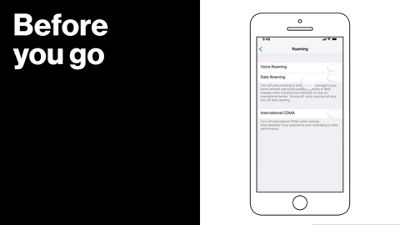
Make sure you enable roaming before you go, so that you can use data and voice services internationally.
00:14
Go to Settings, select Cellular, then Roaming, and make sure data and voice roaming are turned on.
00:21
Remember, it may take up to three minutes for your phone to connect to local networks.
00:25
If you experience service issues, be sure to turn your device off, and back on. This is a simple, yet effective way to reconnect your device with the international network while traveling.
00:35
Making calls from outside the US will always need the international access code followed by a country code, and then the number you're calling.
00:42
So on your iPhone, hold down on the zero until you see the plus sign appear, enter the country code, then dial the number you want to call.
00:49
And if you call a contact stored on your phone, double check that you've included the "+" and country code.
00:55
For more travel tips from Verizon, follow the link below: International Plans: TravelPass
00:58
That's all for now! Enjoy your trip!