Soft Reset - Wireless Home Phone T2000
Here's how to perform a soft reset on your Wireless Home Phone T2000 if it becomes unresponsive.
A soft reset (turning the device off then back on) is similar to restarting a desktop computer and is one of the first steps in troubleshooting a device.
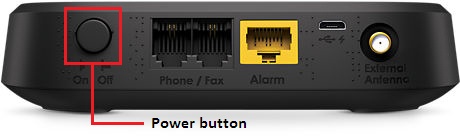
- Press thePower button(on the back of the unit) to turn the device off
- Insert the battery.
- Press thePower buttonagain to turn the device back on.The unit is on when the power button is pressed in.