For New and existing myHome customers on all internet plans.
No hidden fees or equipment charges.
Save over 45% on the best entertainment with Verizon. Save $15/mo + Perk on us when you bundle mobile + home.

The internet you want offers you more
Check which internet service is available in your area. Switch to select plans and get your choice of our latest offers.
Samsung 43” Class Q7F QLED TV on us
With select Verizon Home Internet plans.
Samsung 43” Class Q7F QLED TV on us
With select Verizon Home Internet plans.
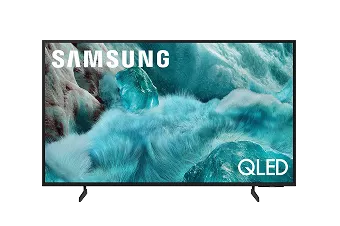
Features:
Experience beautiful visuals and immersive audio with our next-level smart TV featuring Quantum HDR, Pantone Validation and Samsung Vision AI1
-
Q4 AI Processor
Enjoy your content in stunning 4K quality, even if the original source is of lower resolution. Plus, get the most out of what you are watching with AI optimized color boosted picture and audio quality, enhanced accordingly to the type of content. Whether you're cheering for your favorite team or watching a classic from your film collection, take your entertainment to the next level.2 -
100% Color Volume with Quantum Dot
Appreciate every beautiful shade of color with remarkable precision and vibrancy. With Nano-sized Quantum Dots, you can see 100% Color Volume in everything you watch, no matter how bright or dark the scene is. Admire billions of shades at any brightness level and be captivated by rich, colorful scenery.3 - Samsung Knox Security
Your TV experiences are secured. Samsung Knox Security protects you from harmful attacks by automatically blocking unauthorized apps and phishing websites. It also safeguards your IoT devices connected to your TV, plus your sensitive information, including your PIN codes and passwords. With regular updates, your TV is always kept safe.4
-
1Samsung Vision AI and associated features vary by 2025 TV model (not available on Q6F, Crystal UHD and select special models). AI Upscaling utilizes AI-based formulas. -
2Utilizes AI based formulas to adjust color and sound. -
3100% color volume measured in Movie Mode and the DCI P3 color space, certified by VDE. -
4Personal data includes directly input PIN codes and passwords, and IoT device information shared through the SmartThings app. The latest software is required.
Samsung Galaxy
Tab S10 FE 5G on us
With select Verizon Home Internet plans.
Samsung Galaxy Tab S10 FE 5G on us
With select Verizon Home Internet plans.
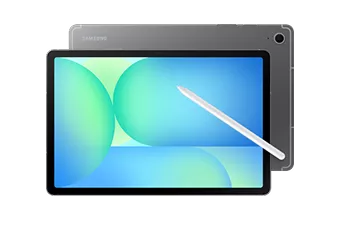
Features:
Maximize your downtime, get more done in no time with immersive entertainment on the go
- Expansive Visuals: Dive into your content on a vibrant 10.9" display that brings everything to life.
- Intuitive Search with Circle to Search: Effortlessly find what you're looking for by simply circling anything on your screen with Circle to Search with Google.
- Built for Adventure: With IP68 water and dust resistance and 5G connectivity, the Tab S10 FE 5G is ready for both home relaxation and outdoor exploration.
- Unleash Creativity with S Pen: The included S Pen allows you to capture notes, sketch ideas, and doodle whenever inspiration strikes.
Add the perks you want
Save on entertainment you love like Netflix and Max, and Disney+, Hulu, and ESPN+
Netflix & HBO Max (With Ads)
DetailsDisney+, Hulu, ESPN+ (With Ads)
DetailsApple One
DetailsApple Music Family
DetailsYouTube Premium
DetailsUnlimited Cloud Storage
DetailsHome Device Support & Protection
DetailsGoogle AI Pro
DetailsMore ways to save
Have questions? We’ve got answers.
Is Frontier becoming Verizon?
Frontier is now a Verizon company, bringing better value and more choices to millions more customers across the country. By integrating Frontier's complementary pure-play fiber network with Verizon’s industry-leading Fios and mobility assets, the company now has an expanded reach of almost 30 million fiber passings across 31 states and Washington, D.C. With the greater availability of premium home internet and mobility services, customers have exclusive access to new services, savings and value they can't get anywhere else. This expansion includes plan offerings for fiber optic home internet, fiber optic business internet, landline phones, and Fios TV.
See if you're eligible for fiber home internet by checking availability.
I'm a Frontier customer and I'm moving. What actions do I need to take?
For existing Frontier customers, you can check availability to see what internet options are available at your new address. If you remain in the Frontier footprint, you will continue to manage your move through your Frontier account.
Can I move my current Verizon Home Internet service to a new address?
Verizon can help you move your home internet service to a new address. Verizon makes it easy for you to stay connected while you start your new adventure. To find out if Verizon offers home internet at your new address, enter your address or check out our coverage map to see what other services may be available. For existing Fios customers, sign into your Fios account to get started. For 5G Home and LTE Home Internet customers, sign in here to see if service is available at your new address.
If you have more questions about moving your Verizon Home Internet, check out our movers FAQ page.
What are the steps to moving my home internet?
Moving your home internet to a new address is easy. Follow these steps to ensure you have a smooth transition:
- 1. Step 1 - Qualify service for new address
- 2. Step 2 - Schedule your move
- 3. Step 3 - Setup at your new address
If you have any questions, please visit our home internet moving guide, support services or reach out to our customer service by chatting with our virtual assistant or giving us a call at 1.800.837.4966
What internet is available at my new address?
To see which Verizon home internet service is available at your new address, check availability. You can also check the coverage map to find out what other services may be available where you live.
The home internet service available at your new address will depend on where you're located. Fios provides 100% fiber-optic internet with supercharged speeds and is widely available in metro and suburban areas of the Northeast and Mid-Atlantic like New York City, Boston, and Philadelphia. 5G Home Internet is now in more and more places around the country and is fast, reliable home internet so you can game, stream and connect the way you want.*
If you find that Verizon Home Internet is not available at your new address, you may still be able to purchase Verizon Wi-Fi Backup. Which can quickly get you back online or if your internet is down. Find out more about Verizon Wi-Fi Backup to keep your home connected to our award winning wireless network.
*5G Home Internet service provided through cellular network; speeds vary due to factors affecting cellular networks
When should I set up Verizon Home Internet at my new home?
You should set up your Verizon Home Internet as soon as you move to your new home, and no later than 30 days from your initial order date. Your move order is only active for 30 days, so if that lapses, your registration may be canceled and you may need to place a new move order. The sooner you set up your home internet, the sooner you can start streaming, gaming, and browsing the web.
I'm moving and Verizon internet is available at my new address. Do I need to pay an installation fee?
You might not need to pay a set up fee depending on your plan and location. For 5G Home service, you can set up the equipment on your own, at no cost. In some areas, 5G Home professional assistance may be available for an additional charge.
If you're transferring Fios internet to a new home, there may be an installation or setup charge when your new service is installed. Log into your account and let us know what you will be moving to begin transferring your internet service.
What internet speed do I need when I'm moving to a new home?
Your ideal internet speed will depend on how you are using the internet. If your household has multiple devices connected to stream TV shows, work from home, take video calls, or play video games, then faster internet speeds might be the best option for you.
- Fios 300: With download speeds up to 300 Mbps, you can easily stream (including 4K video), game and make video calls on multiple devices at once
- Fios 500: Download full-length movies in minutes or immerse yourself in online virtual reality games.
- Fios 1 Gig and 2 Gig: Enjoy even lower latency and less lag, with enough bandwidth for any activity and lots of connected devices.
- 5G Home: Get reliable download speeds capable of 1080p HD video streaming and a 3-year price lock guarantee.
- 5G Home Plus: Enjoy unlimited premium data with faster download speeds and a 4-year price-lock guarantee, so you don’t have to worry about unexpected rate hikes.
- 5G Home Ultimate: Offering our fastest fixed wireless speeds and a 5-year price lock guarantee, you can stream shows and movies in brilliant Ultra HD 4K resolution
When I'm moving, can I keep my current plan and equipment?
Keeping your internet plan and equipment depends on which service and equipment are compatible with your new address.
If the service you currently have isn't offered at your new address, you will need to switch to the service that is available and get new equipment that is compatible with that service. Enter your new address to find out if you can bring your current plan and equipment to your new home.
I'm moving to a new apartment. How do I get internet service there?
If you're moving to a new apartment, the internet service offered will depend on many factors. Some apartments let you purchase your own internet service, while others have internet services provided within the building. When moving to a condo or an apartment, check with your landlord first to see if they offer Verizon Home Internet Services.