Business Mobility Devices Activation Guide
In this help section you can find instructions and device requirements to activate business mobility devices: iPhone, iPad, Android phone and tablet.
Activating a New Device on a New Business Line
This section provides instructions for activating a new device (iPhone, iPad, Samsung Phone, Samsung Tablet and Pixel Phone) on a new business line.
Instructions to activate a new device on a new business line:
- Turn on the new device.
- Follow the onscreen instructions.
- Connect to Wi-Fi when prompted for the duration of the activation. It is preferred that non-corporate Wi-Fi is used, as corporate network policies may hinder the activation request.
Need Help?
For assistance with device activation, you can contact Verizon support by calling 1-877-807-4646.
Activating a New Device on an Existing Business Line
This section provides instructions for activating a new device (iPhone, iPad, Samsung Phone, Samsung Tablet and Pixel Phone) on an existing business line.
Instructions to activate a new device on an existing business line:
- Turn on the new device.
- Follow the onscreen instructions.
- Connect to Wi-Fi when prompted for the duration of the activation. It is preferred that non-corporate Wi-Fi is used, as corporate network policies may hinder the activation request.
- Follow the on-screen prompt during set up to transfer your number, or do it later in Settings.
Need Help?
Please select the device manufacturer and device below to see instructions.
Disclaimer: The displayed screen examples may vary based on the model and OS version.
Steps During Setup
During the setup process, a screen should appear offering the option to transfer your number from a previous device.
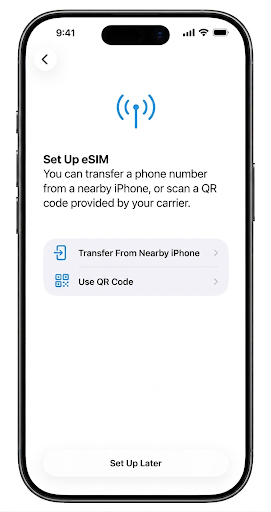
- If your previous device is an iPhone, select "Transfer From Nearby iPhone" and follow the onscreen guidelines on both phones.
- If you skip the eSIM transfer during initial setup, you can initiate it later via the Cellular > Set Up Cellular section in the Settings application.
- If your old device is Android, after you are done completing the setup process, navigate to the Settings application, select "Cellular > Set Up Cellular," and choose the "Transfer From Android Phone" option under "Set Up eSIM."
Activating Via Settings Application
If you bypassed the eSIM transfer during setup, open the Settings application and navigate to the "Cellular > Set Up Cellular" section to view the following screen:
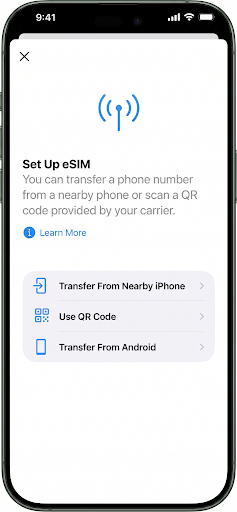
Choose the option that matches your previous device.
Whether you configure this during initial setup or later through Settings, choosing "Transfer From Nearby iPhone" will trigger the following notification on your previous iPhone:
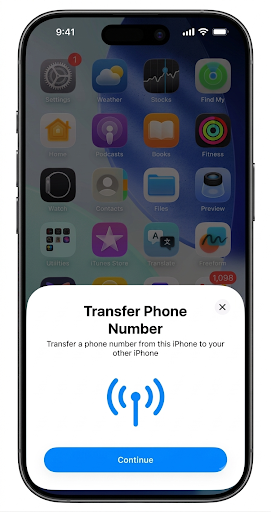
If the notification does not appear, verify the following conditions:
- Confirm that the screen lock option is active on the previous device.
- Bluetooth is enabled on both devices and both are positioned nearby.
- Verify that both devices satisfy the specified system and hardware specifications.
Device and OS Requirements for Device to Device eSIM Transfer
New Device Requirements:
- iPhone 12 and above support eSIM transfer
Old Device Requirements:
| Pixel | |
|---|---|
| Minimum Requirements | Any Pixel phone with software build version DecQPR'2024 or above |
| Samsung | |
| Minimum Requirements | Any Samsung phone with Samsung OneUI version 8.5 or above |
| iPhone | |
| Minimum Requirements | iPhone 12 or above with iOS 16 or above |
Need Help?
For assistance with the activation process, please contact Verizon support directly at 1-877-807-4646.
Steps During Setup
During the setup process, a screen should appear offering the option to transfer your number from a previous device.
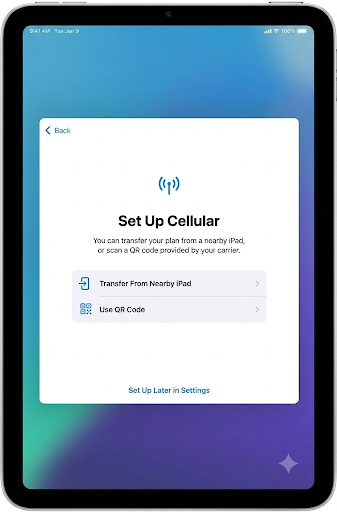
- Please select "Transfer From Nearby iPad" and follow the onscreen instructions on both the old and new iPads.
- If you skip the eSIM transfer during initial setup, you can initiate it later via the "Cellular Data > Transfer iPad Plan" section in the Settings application.
Activating Via Settings Application
In case you skipped eSIM transfer during setup, launch Settings application and go to "Cellular Data → Transfer iPad Plan" section and you shall see the following screen:
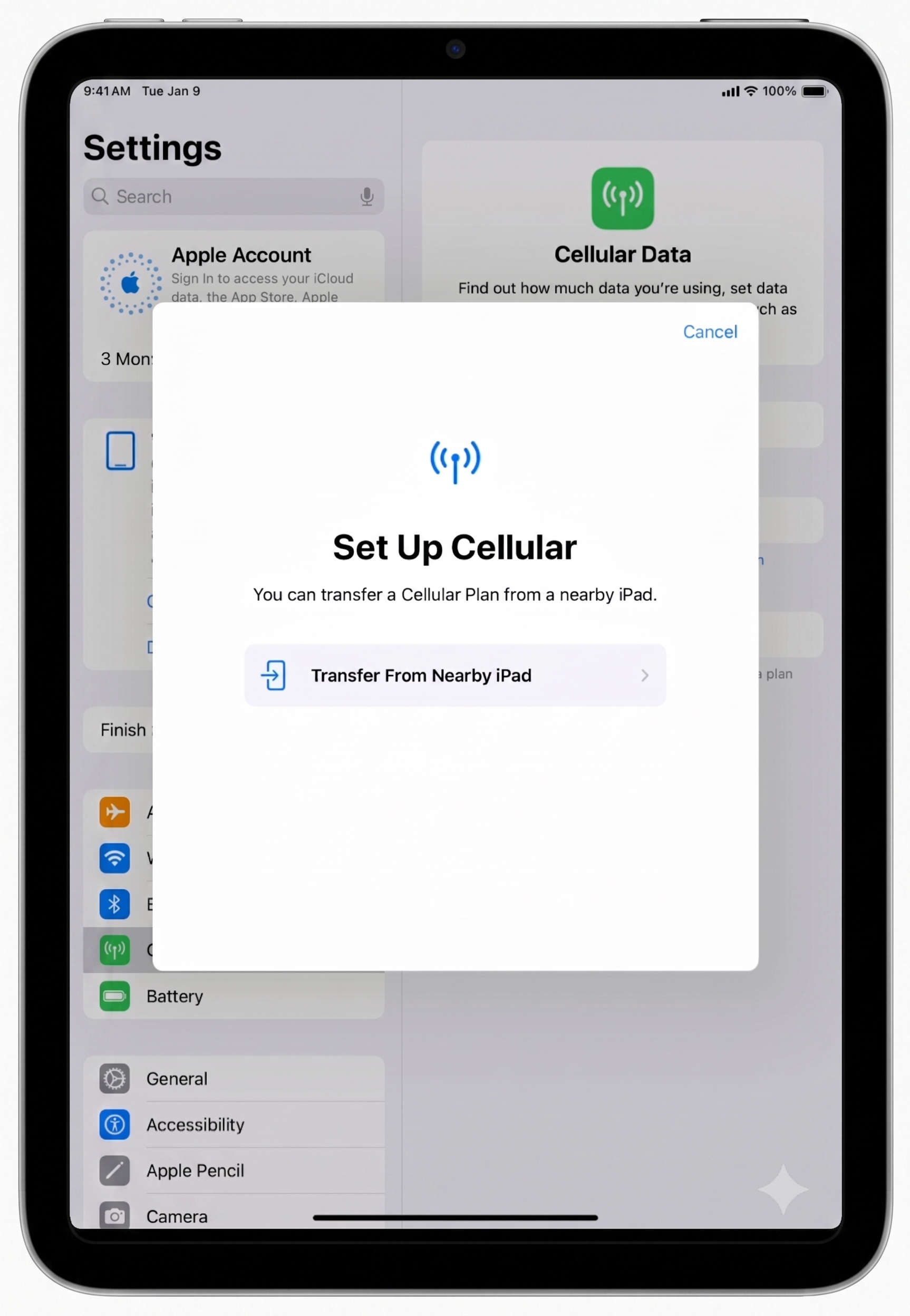
Please select "Transfer From Nearby iPad" and follow the onscreen instructions on both the old and new iPads.
Whether you select "Transfer From Nearby iPad" during initial setup or later through Settings, it will trigger an alert Transfer Phone Number alert on your old iPad.
If you don't see the alert, please check the following:
- Confirm that the screen lock option is active on the previous device.
- Bluetooth is enabled on both devices and both are positioned nearby.
- Verify that both devices satisfy the specified system and hardware specifications.
Device and OS Requirements for Device to Device eSIM Transfer
- Only iPad-to-iPad eSIM transfer is allowed.
| iPad | |
|---|---|
| Minimum Requirements | Both old and new devices must be the following or newer iPad models with iOS 17 or above: iPad Pro (11-inch 1st-4th gen, 12.9-inch 3rd-6th gen, M4) iPad Air (3rd-5th gen, M2, M3) iPad mini (5th-6th gen, A17 Pro) iPad (7th-10th gen, A16) |
Need Help?
For assistance with the activation process, please contact Verizon support directly at 1-877-807-4646.
Steps During Setup
During the setup process, a screen should appear offering the option to transfer your number from a previous device.
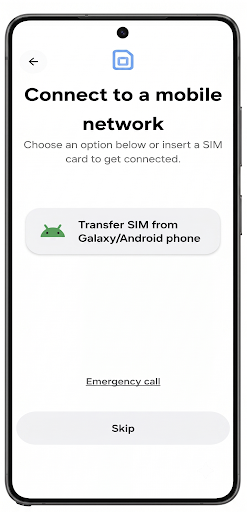
- If your previous device is an Android phone, select "Transfer SIM from Galaxy/Android phone" and follow the onscreen guidelines on both phones.
- If you skip the eSIM transfer during initial setup, you can initiate it later via “Connections > SIM manager > Add eSIM” section in the Settings application.
- If your old device is an iPhone, after you are done completing the setup process, navigate to “Connections > SIM manager > Add eSIM” section of the Settings application and select "Transfer SIM from iPhone".
Activating Via Settings Application
If you bypassed the eSIM transfer during setup, open the Settings application and navigate to the "Connections > SIM manager > Add eSIM" section to view the following screen:
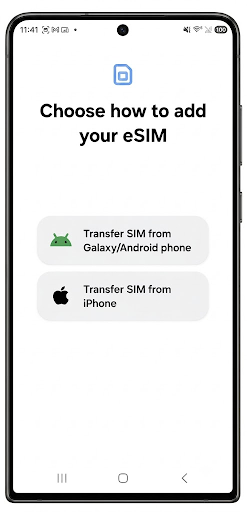
Choose the option that matches your previous device.
Whether you configure this during initial setup or later through Settings, choosing "Transfer SIM from Galaxy/Android phone" will trigger the following notification on your previous phone:
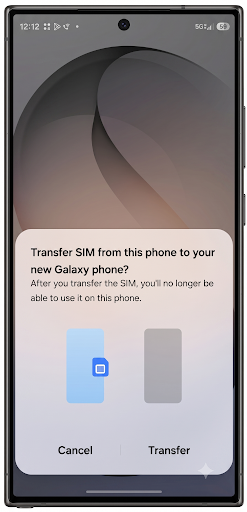
If the notification does not appear, verify the following conditions:
- Confirm that the screen lock option is active on the previous device.
- Bluetooth is enabled on both devices and both are positioned nearby.
- Verify that both devices satisfy the specified system and hardware specifications.
Device and OS Requirements for Device to Device eSIM Transfer
New Device Requirements:
- Samsung Galaxy S24 and above
Old Device Requirements:
| Samsung | |
|---|---|
| Supported Models | S21 and above Fold 3 and above Flip 3 and above XCover 6 Pro and above A54 5G and A16 |
| Minimum OS Requirements | Android 10 or higher Google Play services 24.02.13 and above OneUI 6.1 (Samsung One UI) |
| Pixel | |
| Minimum Requirements | Any Pixel phone with:
|
| iPhone | |
| Minimum Requirements | An iPhone meeting the following requirements:
|
Need Help?
For assistance with the activation process, please contact Verizon support directly at 1-877-807-4646.
Steps During Setup
During the setup process, a screen should appear offering the option to transfer your number from a previous device.
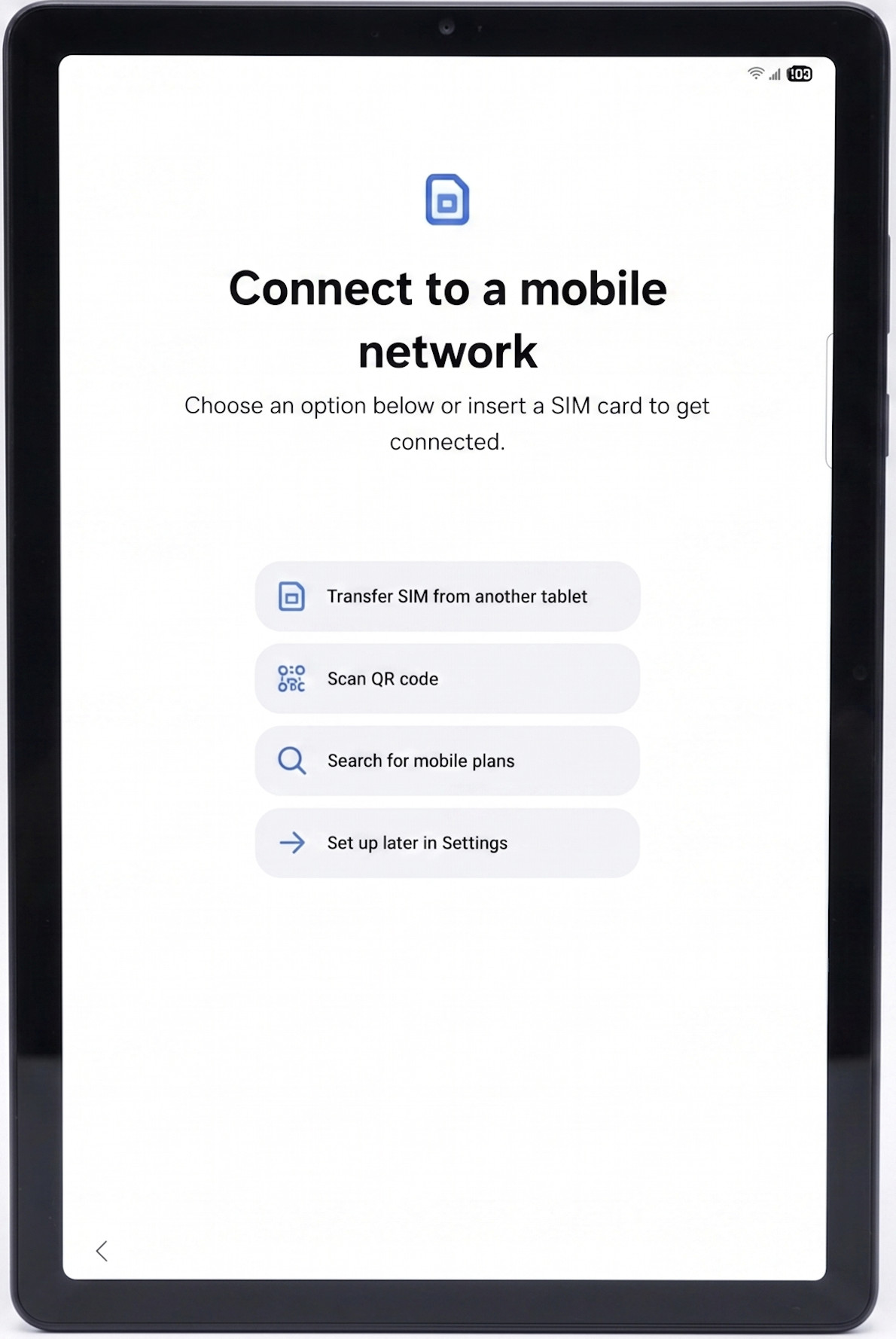
- Please select "Transfer SIM from another tablet" and follow the onscreen instructions on both the old and new tablets.
- If you skip the eSIM transfer during initial setup, you can initiate it later via the "Connections > SIM Manager" section in the Settings application.
Activating Via Settings Application
If you bypassed the eSIM transfer during setup, open the Settings application and navigate to the "Connections > SIM manager > Add eSIM" section to view the following screen:
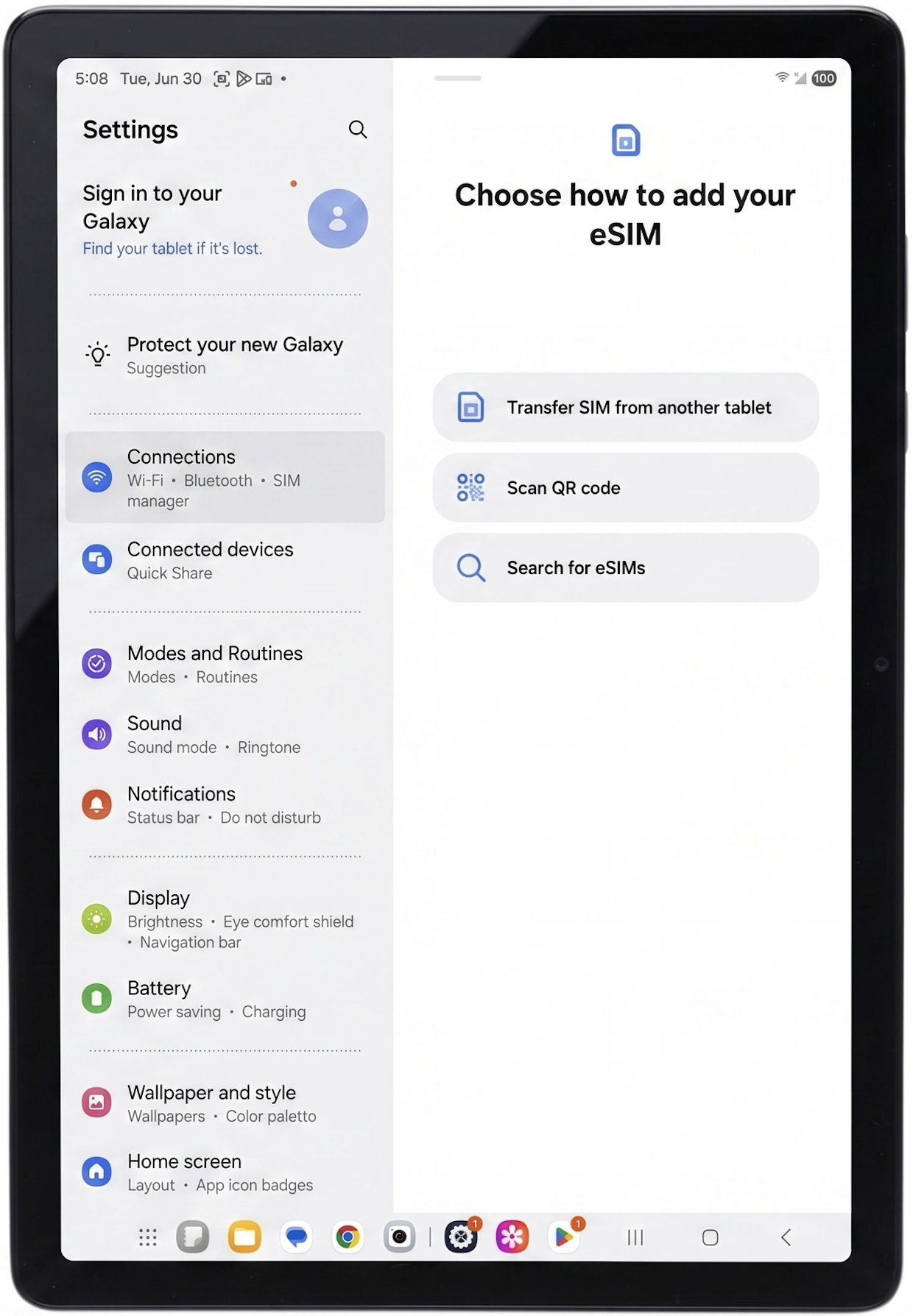
Please select "Transfer SIM from another tablet" and follow the onscreen instructions on both the old and new tablets.
Whether you select "Transfer SIM from another tablet" during initial setup or later through Settings, it will trigger an alert Transfer Phone Number alert on your old tablet.
If the notification does not appear, verify the following conditions:
- Confirm that the screen lock option is active on the previous device.
- Bluetooth is enabled on both devices and both are positioned nearby.
- Verify that both devices satisfy the specified system and hardware specifications.
Need Help?
For assistance with the activation process, please contact Verizon support directly at 1-877-807-4646.
Device and OS Requirements for Device to Device eSIM Transfer
- Only Android tablet to tablet eSIM transfer is allowed.
| Tablets | |
|---|---|
| Supported Models |
|
| Minimum OS Requirements | One UI 6.1.1 (Samsung One UI) and above |
Need Help?
For assistance with the activation process, please contact Verizon support directly at 1-877-807-4646.
Steps During Setup
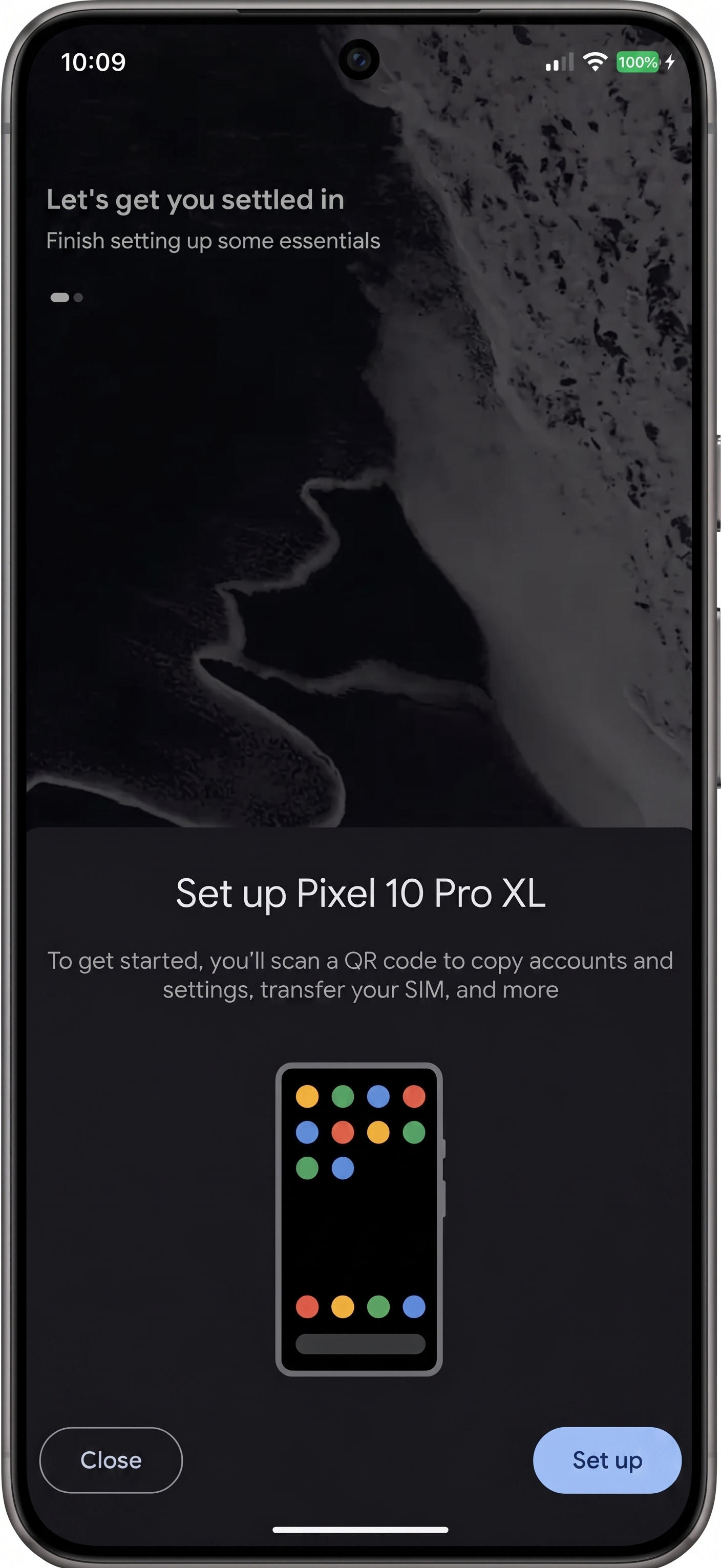
During the setup process, a screen should appear offering to set up the phone using your previous device
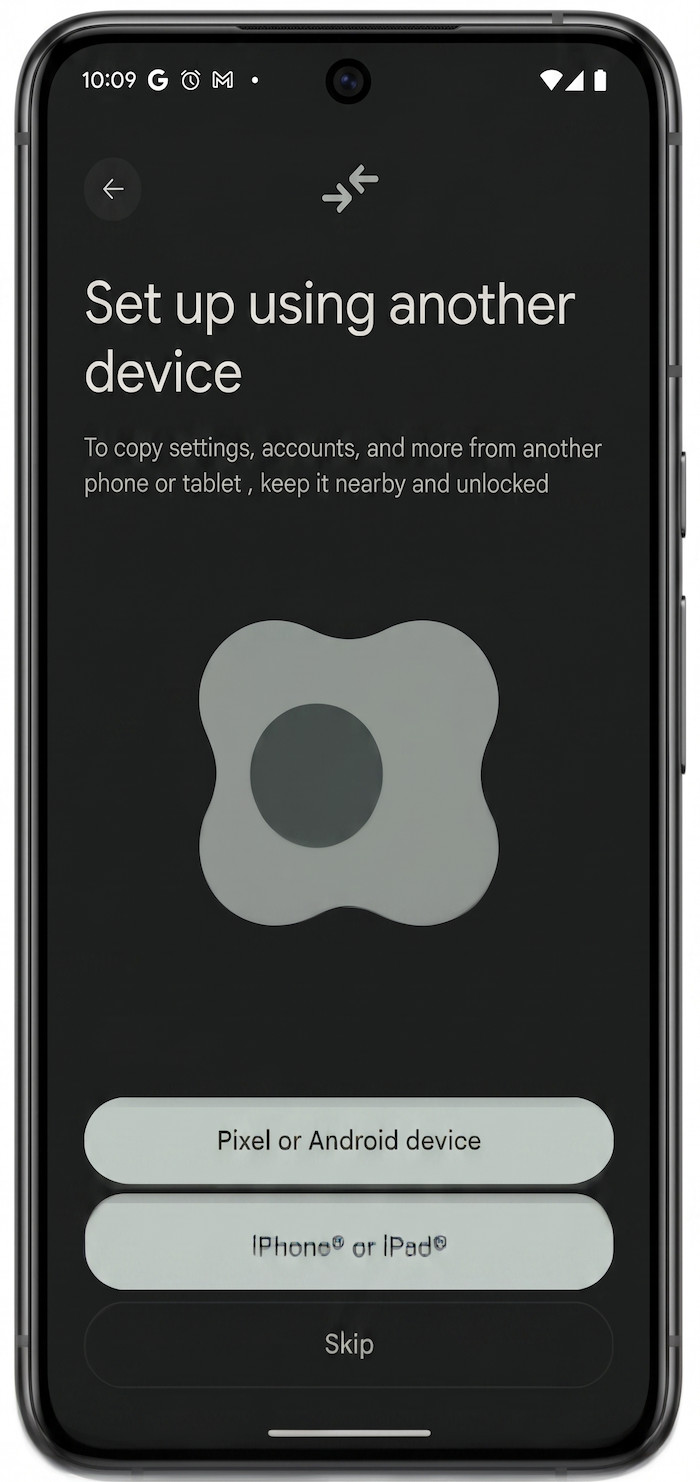
- If your previous device is an Android phone, select "Pixel or Android device" and if it is iPhone, please select "iPhone or iPad" and follow the onscreen guidelines on both phones.
- If you skip the eSIM transfer during initial setup, you can initiate it later via “Network & internet > SIMs > Transfer a SIM from another device” section in the Settings application.
Activating Via Settings Application
If you bypassed the eSIM transfer during setup, open the Settings application and navigate to the "Network & internet > SIMs" section to view the following screen:
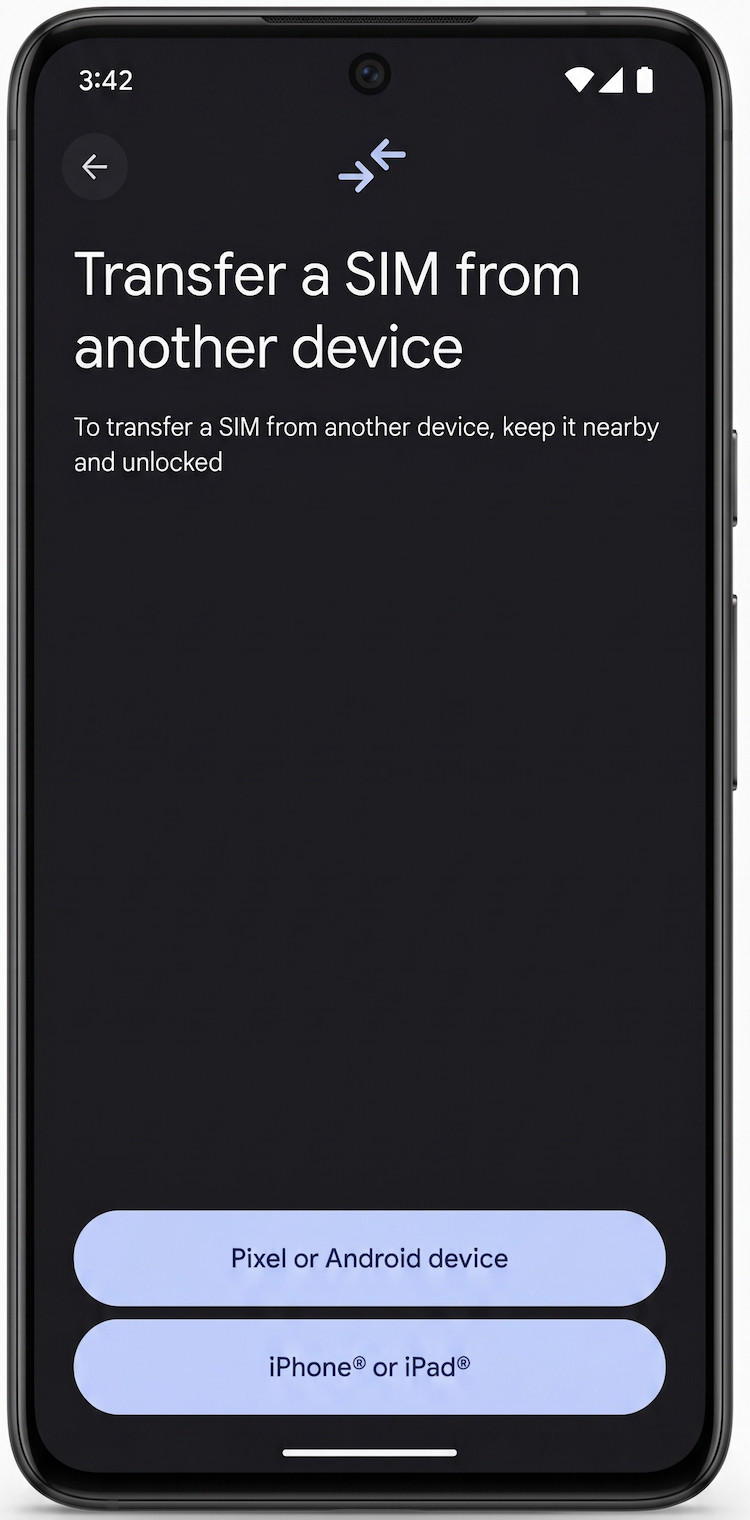
Choose the option that matches your previous device.
Whether you selected "Pixel or Android device" during initial setup or later through Settings and if you your previous device is Pixel, it will trigger the following notification:
If the notification does not appear, verify the following conditions:
- Confirm that the screen lock option is active on the previous device.
- Bluetooth is enabled on both devices and both are positioned nearby.
- Verify that both devices satisfy the specified system and hardware specifications.
Device and OS Requirements for Device to Device eSIM Transfer
| Old Phone = Pixel AND New Phone = Pixel | |
|---|---|
| Supported Models | Pixel 8a or above |
| Minimum OS Requirements | Android 10 or above Google Play Services - 24.35 or above |
(Old Phone = Pixel AND New Phone = Non-Pixel Android Phone) OR (Old Phone = Non-Pixel Android Phone AND New Phone = Pixel) | |
| Minimum OS Requirements | Old Phone OS Requirements:
New Phone OS Requirements:
|
| Old Phone = Pixel AND New Phone = iPhone | |
| Requirements | iPhone 12 or above with iOS 26 or above Pixel with build number AP4A.241205.013 or above |
| Old Phone = iPhone AND New Phone = Pixel | |
| Requirements | iPhone 12 or above with iOS 26 or above Pixel 9 or above with Google Play Services - 25.28.00 or above |
Need Help?
For assistance with the activation process, please contact Verizon support directly at 1-877-807-4646.